

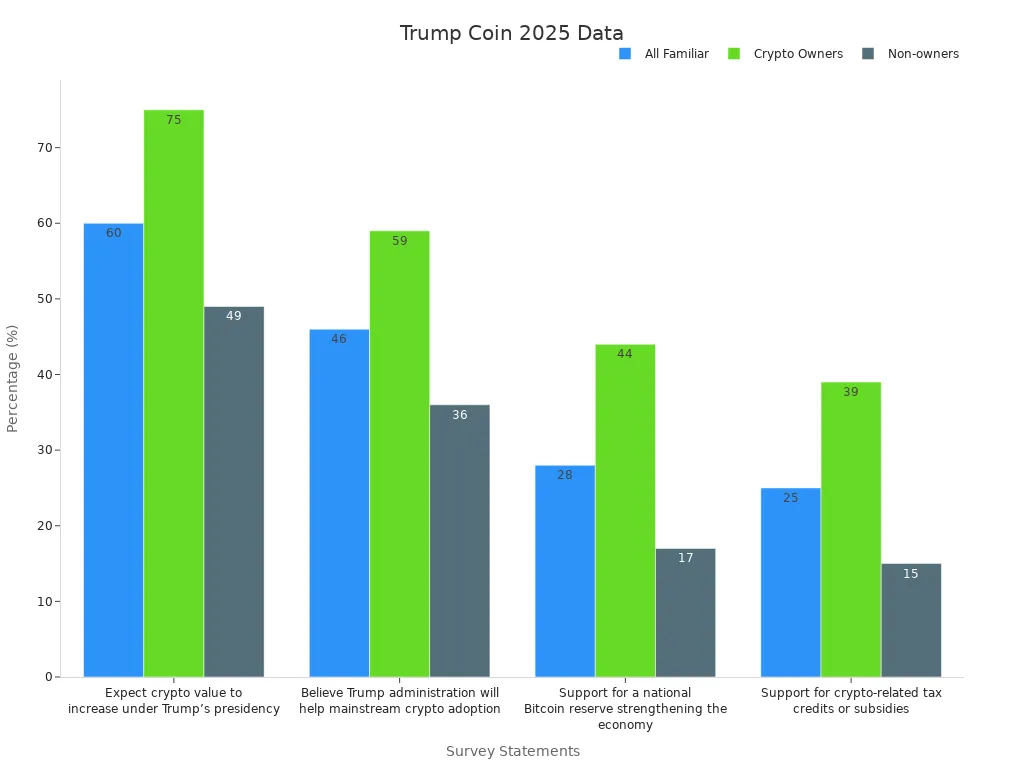
You cannot buy trump coin directly on Coinbase Exchange. However, you can use Coinbase Wallet and a decentralized exchange to buy trumpcoin. Many people want to know how to buy trump coin on coinbase wallet because the coin has seen big swings in value. In early 2025, trump coin jumped from $7 to over $74 in just two days, then dropped to $16 by February and spiked again in March. The coin is now used to pay for trump merchandise and on new crypto platforms. Survey data shows 75% of current crypto owners expect value increases for trump coin this year.
Always use the correct contract address when you buy trumpcoin. Careful steps help you avoid scams in the world of cryptocurrency.
Key Takeaways
Set up your Coinbase Wallet carefully by creating a strong password and storing your recovery phrase offline to protect your crypto.
Fund your wallet with base coins like USDC or ETH before swapping for Trump Coin on a trusted decentralized exchange (DEX).
Always use the official Trump Coin contract address from reliable sources to avoid scams and losing your funds.
Connect your wallet only to verified DEX websites and double-check all swap details before confirming transactions.
Keep your Trump Coin safe by using hardware wallets, backing up keys securely, enabling two-factor authentication, and staying alert for phishing scams.
How to Buy Trump Coin on Coinbase Wallet
Set Up Wallet
You cannot buy trump coin directly on Coinbase Exchange. You need to use Coinbase Wallet and a decentralized exchange to get started. If you want to know how to buy trump coin on coinbase wallet, you must first download the Coinbase Wallet app. You can find it on the App Store or Google Play. After you install the app, open it and follow the prompts to create a new wallet. Choose a strong password that you have not used before. This password protects your wallet from unauthorized access.
Security experts recommend several best practices during wallet setup. The table below shows important steps and why they matter:
Practice | Description | Supporting Evidence / Statistic |
|---|---|---|
Store Private Keys Offline | Use cold wallets (hardware or paper) to keep keys offline, reducing hacking risk. | $3.8 billion in crypto thefts in 2022 highlight risks of improper key storage. |
Use Hardware Wallets | Devices like Ledger or Trezor provide high security by storing keys offline. | Experts recommend buying directly from manufacturers to avoid tampering. |
Enable Multi-Factor Authentication (MFA) | Adds layers of login security (password + device or biometrics). | Bryan Gour warns against storing keys as simple files on PCs; MFA reduces unauthorized access risk. |
Use Strong Passwords and Biometrics | Strong passwords combined with fingerprint or face scans enhance wallet access security. | Platforms like D’CENT use biometric tech; biometric methods are hard to replicate. |
Conduct Regular Security Audits | Frequent external audits and penetration testing identify vulnerabilities early. | OpenZeppelin found critical flaws in major protocols; regular checks prevent exploits. |
Educate Users on Security Hygiene | Training users to avoid phishing, scams, and to maintain good security habits. | Emphasized as a key practice to prevent common user errors leading to theft. |
You should always keep your wallet app updated. Updates fix bugs and patch security holes. Never download wallet apps from unofficial sources. This step helps you avoid fake apps that can steal your trump coin.
Secure Recovery Phrase
After you set up your wallet, the app will show you a recovery phrase. This phrase is a list of 12 or 24 words. You must write these words down and store them in a safe place. Do not take a screenshot or save the phrase on your phone or computer. If someone gets your recovery phrase, they can steal your trump coin and other crypto.
Many people lose access to their wallets because they forget or lose their recovery phrase. Cybercriminals use phishing, malware, and social engineering to trick users into giving up their recovery phrases. Attacks have become more advanced, using AI and fake websites. You can protect yourself by following these steps:
Store it in a secure location, like a safe or lockbox.
Never share your recovery phrase with anyone.
Do not enter your phrase on any website or app except your official wallet.
Teach your family about the importance of keeping the phrase secret.
Tip: If you ever lose your phone or need to restore your wallet, you will need this recovery phrase. Without it, you cannot recover your trump coin or any other crypto in your wallet.
Fund Wallet
You need to fund your Coinbase Wallet before you can buy trumpcoin. Most people use a base currency like USDC or ETH. These coins work well for swaps on decentralized exchanges. To fund your wallet, tap “Receive” in the app. Copy your wallet address. Go to your Coinbase Exchange account or another crypto platform. Send USDC or ETH to your Coinbase Wallet address.
Funding your wallet with USDC or ETH makes transactions fast and reliable. For example, USDC transactions on Coinbase’s Base Layer 2 network take less than a second and cost less than one cent. Humanitarian groups use USDC to send aid quickly and safely. MoneyGram uses USDC for fast payments in over 180 countries. These examples show that using a base coin like USDC or ETH helps you buy and sell trump coin with fewer problems.
After you send funds, check your wallet balance. You should see your USDC or ETH in the app. Now you are ready to learn how to buy trump coin on coinbase wallet using a decentralized exchange. Always double-check the coin you select before you swap. This step helps you avoid scam tokens that look like trump coin.
Connect to DEX to Buy Trumpcoin
Choose DEX
You need to pick a decentralized exchange (DEX) that supports the trump coin. Most trump meme coins, including trump, are not available on big centralized exchanges. This means you must use a DEX to buy and sell trump. Many DEXs exist, but not all are safe or easy to use. You should look for a reputable DEX with a good track record.
Solana-based DEXs like Jupiter Exchange, Raydium, and Serum are popular choices for trading trump. These platforms support the Solana blockchain, which is where trump is deployed.
Always check if the DEX lists the official trump coin. Verified listings help you avoid scam tokens.
Use DEXs that have regular security audits and active communities. This lowers your risk of losing funds.
Tip: You can find information about DEX safety and token listings on trusted sites like CoinMarketCap and SolScan. These sites show if a coin is real and if the DEX is reputable.
Link Wallet
After you choose a DEX, you need to connect your wallet. Coinbase Wallet works with many DEXs, but you may also use other Solana-compatible wallets like Phantom. Linking your wallet lets you trade directly from your device.
Open the DEX website or app.
Click the “Connect Wallet” button.
Choose Coinbase Wallet or your preferred wallet from the list.
Approve the connection in your wallet app.
Many wallets, such as MetaMask and Trust Wallet, offer built-in swap features. These features let you swap coins without leaving the wallet. You should always keep your wallet updated to avoid problems during swaps. Some DEXs also work with aggregators like 1inch, which help you find the best rates and lower slippage.
Note: Only connect your wallet to official DEX websites. Fake sites can steal your trump coin and other crypto.
Find Contract Address
Before you swap, you must find the correct contract address for trump. Using the wrong address can lead to losing your funds. Trusted sources like CoinMarketCap list the official contract address for trump coin. For example, CoinMarketCap shows the Trump Coin (TRUMP2024) token with the contract address 0xa41f7ed89d86258bb8fdef8e77e91f43c28ab74c on the Ethereum blockchain. You can also check SolScan for Solana-based tokens.
Copy the contract address from a trusted source.
Double-check the address on the DEX before you start the swap.
Never use addresses from random social media posts or unknown websites.
Academic research and market analysis confirm the existence and activity of trump coin in the crypto ecosystem. These sources help you trust that you are buying the real trump coin.
Swap for Trump
Now you are ready to swap your base currency, such as USDC or ETH, for trump. Follow these steps to complete your purchase:
Make sure your wallet has enough SOL to cover transaction fees.
On the DEX, select the base coin you want to swap (like USDC or ETH).
Paste the official trump contract address into the search bar to find the correct token.
Enter the amount you want to swap.
Review the swap details, including the rate and fees.
Set your slippage tolerance (usually 0.5–1%) to avoid failed swaps.
Confirm and approve the swap in your wallet app.
Most swaps finish in less than a minute. If you are new to DEX trading, start with a small test transaction. This helps you check if everything works before you swap larger amounts. Always check your wallet after the swap to make sure you received your trump coin.
Tip: Trade during off-peak hours to save on network fees. If your swap fails, your funds will return to your wallet.
You now know how to buy trumpcoin using a DEX and Coinbase Wallet. This process lets you join the trump crypto community and manage your coins safely.
Verify and Secure Trump
Check Token Balance
After you finish your swap, you need to check if trump appears in your wallet. Open your Coinbase Wallet app and look for the trump token in your asset list. If you do not see trump, tap “Add Token” and paste the official contract address. This step helps you avoid missing trump in your wallet. Sometimes, new tokens like trump do not show up right away. You may need to refresh your wallet or restart the app.
You should always double-check the amount of trump you received. Compare the number of trump tokens in your wallet with the amount you swapped. If the numbers do not match, review your transaction history. Most wallets show a list of recent swaps. This list helps you track your trump and spot any problems.
Tip: If you have trouble finding trump, visit the official trump coin website or trusted crypto tracking sites. These sites often provide guides for adding trump to your wallet.
Store Safely
You must protect your trump from hackers, scams, and mistakes. Many people lose trump because they do not follow safe storage steps. Security audits show that online hacking, phishing, and lost private keys cause most losses in crypto. For example, one user lost thousands of trump after sending it to the wrong address. Another lost all their trump when their phone was stolen and they had no backup.
Follow these best practices to keep your trump safe:
Use both hardware wallets and software wallets for trump. Hardware wallets keep your trump offline and safe from online attacks.
Back up your trump recovery phrase and private keys on metal cards. Metal cards resist fire and water, so your trump stays safe.
Spread your trump across several wallets. This way, if you lose one, you do not lose all your trump.
Turn on two-factor authentication for every account that holds trump.
Use a VPN when you access your trump wallet. Avoid public Wi-Fi to keep your trump secure.
Update your wallet app and security software often. Updates fix bugs that could put your trump at risk.
Check your trump accounts for strange activity. Set up alerts to catch problems early.
Try multi-signature wallets for trump. These wallets need more than one key to move trump.
Pick trading platforms that audit their security and offer insurance for trump theft.
Note: Always keep your trump recovery phrase private. Never share it with anyone, not even with people who claim to help you recover trump.
A table below summarizes key risks and how to avoid them when storing trump:
Risk | How to Avoid Losing Trump |
|---|---|
Online hacking | Use hardware wallets for trump |
Phishing scams | Only use official trump sites |
Lost private keys | Back up trump keys offline |
Sending trump to wrong address | Double-check trump addresses |
Physical damage | Store trump backups on metal |
You now know how to check your trump balance and store your trump safely. These steps help you keep your trump secure and protect your crypto journey. Always stay alert and follow the latest safety tips for trump and other coin assets.
Security Tips
You must protect your trump and other crypto assets by following strong security habits. Many people lose trump because they do not double-check contract addresses or fall for phishing scams. Always check the contract address before you buy or send trump. Scammers often create fake tokens that look like the real trump coin. If you use the wrong address, you could lose your trump forever.
Phishing attacks remain a big threat in the crypto world. Most phishing happens through email or fake websites. Attackers try to trick you into clicking links or entering your wallet details. In one year, phishing scams caused losses of up to $61 million in the United States. Even trained users sometimes click on fake links when they feel tired or rushed. You can avoid these traps by checking every website URL and sender address before you act. Never trust links from social media or unknown sources when dealing with trump.
Tip: Always use official sources like CoinMarketCap or the trump coin website to find contract addresses. Bookmark these sites to avoid mistakes.
Never share your private keys or recovery phrases with anyone. Your private key gives full control over your trump. If someone gets your key, they can steal all your crypto. Reports show that private key theft now causes almost half of all hacking losses in crypto. Hackers use tricks and malware to steal keys, as seen in the Atomic Wallet case. You should write your recovery phrase on paper or metal and keep it in a safe place. Do not store it on your phone or computer.
Here is a quick checklist to keep your trump safe:
Double-check every contract address before you swap or send trump.
Avoid clicking on links in emails or messages about trump.
Use only official sites for trump coin information.
Keep your private keys and recovery phrases offline.
Stay alert for scam tokens that copy the trump name.
Security Step | Why It Matters for Trump |
|---|---|
Verify contract addresses | Prevents loss of trump to scams |
Use official sources | Ensures you get real trump |
Never share private keys | Protects your trump from theft |
Watch for phishing links | Stops hackers from stealing trump |
By following these tips, you can keep your trump and other crypto assets secure. Stay alert and always double-check before making any move with your trump.
You can buy trump with Coinbase Wallet by following clear steps. Start by setting up your wallet, funding it, and using a trusted DEX to swap for trump. Always use the official contract address for trump and check your token balance after each swap. Coinbase offers strong security features, and trump is now listed on major exchanges, which adds trust. You protect your trump by double-checking every detail and staying alert for scams. Keep learning about crypto safety to secure your trump for the future.
FAQ
How do I find the official Trump Coin contract address?
You should always check trusted sites like CoinMarketCap or the official Trump Coin website. Copy the contract address from these sources. Never use addresses from random social media posts.
What should I do if my Trump Coin does not show up in Coinbase Wallet?
Tap “Add Token” in your wallet. Paste the official contract address for Trump Coin. Refresh your wallet or restart the app. This usually makes the token appear.
Can I buy Trump Coin with a credit card on Coinbase Wallet?
No, you cannot buy Trump Coin directly with a credit card. You must first buy a base coin like USDC or ETH, then swap it for Trump Coin using a DEX.
What fees should I expect when swapping for Trump Coin?
You pay network fees and DEX swap fees. These fees change based on network activity. For example:
Fee Type | Typical Range |
|---|---|
Network Fee | $0.01 – $5 |
DEX Swap Fee | 0.1% – 0.3% |
How can I keep my Trump Coin safe from scams?
Always double-check contract addresses. Use only official websites. Never share your recovery phrase or private keys. Stay alert for fake tokens and phishing links.

