

Choosing between kraken vs. coinbase depends on what you need most. If you want an easy start, coinbase vs kraken makes coinbase the top pick for beginners with its simple design and millions of active users. When you care most about low fees and advanced trading, kraken vs. coinbase gives kraken the edge. Many users pick kraken for strong security, professional tools, and support for over 200 cryptocurrencies. Studies show users look for security, simple interfaces, and affordable fees when picking an exchange.
Tip: Always check fees, support, and security before you sign up.
Key Takeaways
Coinbase is best for beginners who want a simple, easy-to-use platform with fast setup and strong support.
Kraken suits advanced users seeking lower fees, more trading options like margin and futures, and professional tools.
Both platforms offer strong security with two-factor authentication and cold storage, but Kraken adds regular audits and transparency.
Kraken usually has lower trading fees and better cost savings for frequent or high-volume traders.
Choose Coinbase for quick start and user-friendly design; pick Kraken for advanced features, global reach, and cost efficiency.
Coinbase vs Kraken Overview
When you compare coinbase vs kraken, you see two of the most popular crypto exchanges. Each platform has its own strengths and user focus. You should look at their main features, user experience, and trading options before you decide which one fits your needs.
Coinbase Highlights
Coinbase stands out for its easy-to-use design. You can start trading quickly, even if you are new to crypto. The platform offers a simple interface and clear instructions. Many users in North America choose coinbase because it is beginner-friendly and supports a wide range of cryptocurrencies. You get access to educational rewards, a built-in wallet, and even a debit card. Coinbase also focuses on making USDC a leading stablecoin and supports strong liquidity. The company has a large market cap and continues to grow its revenue. You will find coinbase helpful if you want to learn about crypto and trade with confidence.
Note: Coinbase is the largest registered crypto exchange in the United States and is popular among part-time traders and beginners.
Kraken Highlights
Kraken is known for its advanced technology and professional trading tools. If you want more control and deeper trading features, kraken gives you margin, futures, and spot trading. The platform has a strong record for security and uptime. Kraken supports over 200 cryptocurrencies and offers more staking options than coinbase. You can use kraken’s apps for both beginners and advanced traders. The exchange is popular worldwide, especially among experienced users and institutions. Kraken also provides 24/7 customer support and a wide range of fiat funding options. You will benefit from kraken if you want lower fees and more advanced trading features.
Key Differences
The main differences between kraken vs. coinbase come down to user focus and features. Coinbase is best for beginners who want a simple experience and easy access to crypto. Kraken is better for advanced users who need more trading options and lower fees. Both platforms offer strong security, but kraken has a flawless record over the past decade. You will notice that coinbase supports more products for general users, while kraken focuses on professional tools and global reach.
Feature / Metric | Kraken | Coinbase |
|---|---|---|
Active Users | 8.8 million | |
Supported Cryptocurrencies | 634 markets, 200+ cryptocurrencies | 156 markets, 405+ cryptocurrencies |
Trading Fees | Up to 0.60% | Up to 0.40% |
Withdrawal Fees | Up to $60 | Up to 3% |
Trading Options | Margin, Futures, Spot, Staking | Spot trading only |
User Base Focus | Advanced users, institutions, pro traders | Beginners, part-time traders |
Security | Excellent | Excellent |
Mobile Apps | Yes (Android & iOS) | Yes (Android & iOS) |
Additional Features | Crypto guides, videos, podcasts | Built-in wallet, NFT support, notifications |
Fiat Currency Support | USD, CAD, JPY, CHF, GBP, AUD | USD, EUR, and more |
Customer Support | 24/7 support | Standard support |
Market Popularity | More popular globally among advanced users | More popular in North America |
Tip: If you want a simple start, coinbase is your best choice. If you want more trading features and lower costs, kraken is the way to go.
Security Comparison

Security Features
When you look at security features, both kraken and coinbase work hard to keep your assets safe. You get two-factor authentication on both platforms, which means you need a code from your phone or app to log in. This extra step helps stop hackers from getting into your account. Coinbase stores about 98% of user assets in cold storage, which means your crypto stays offline and away from internet threats. Kraken also uses air-gapped cold storage for about 95% of its assets, making it very hard for anyone to steal your funds.
Kraken stands out with advanced security features. The platform runs regular proof-of-reserves audits with outside experts. These audits let you check that kraken really holds the assets it claims. Kraken also completed the SOC 2, Type I examination, which checks how well the company protects your data and keeps its systems running. You will find that kraken runs both internal and external security audits and has a bug bounty program. This program rewards people who find and report security problems, so kraken can fix them fast.
Coinbase gives you strong security features too. You get FDIC pass-through insurance for US dollar balances up to $250,000. The platform also has crime insurance to protect against theft and cyberattacks. Coinbase uses two-factor authentication, biometric logins, and hardware security keys for extra protection. You can whitelist withdrawal addresses, so only approved wallets can get your funds. Both kraken and coinbase use advanced security to protect your crypto, but kraken focuses more on audits and transparency, while coinbase adds insurance and easy-to-use safety tools.
Note: If you want to check if an exchange really holds your crypto, kraken’s proof-of-reserves audits give you that peace of mind.
Regulatory Compliance
You need to know if your exchange follows the law. Both kraken and coinbase meet strict rules in the United States and Europe. In the US, coinbase holds a New York BitLicense, registers with FinCEN, and faces oversight from the SEC as a public company. The company runs annual audits and sometimes removes coins to stay compliant. Kraken also registers with the SEC and has settled past issues, like stopping its staking program after a $30 million settlement.
In Europe, both kraken and coinbase now hold MiCA licenses through Ireland. MiCA is a new law that covers all 27 EU countries and sets high standards for consumer protection, fair trading, and secure custody. Kraken also holds Electronic Money Institution and MiFID licenses, and registers as a Virtual Asset Service Provider in several EU countries. This means you get strong legal protection and clear rules when you use kraken or coinbase in Europe.
Exchange | European Compliance | Additional Compliance Measures | |
|---|---|---|---|
Coinbase | New York BitLicense, FinCEN, SEC oversight, annual audits | MiCA license via Ireland | Reports to tax authorities, blocks sanctioned regions |
Kraken | SEC registration, settled staking case | Reports to tax authorities, blocks high-risk regions |
Kraken’s proactive security and global licenses show a strong focus on following the rules. Coinbase’s regulatory strengths come from its public company status and wide US presence. You get high levels of user safety on both platforms, but coinbase may feel more familiar if you live in the US.
User Protections
You want to know how each platform protects you from theft, fraud, or mistakes. Coinbase gives you a crime insurance policy that covers digital assets against theft and cyberattacks, with a coverage limit of $255 million. If you are a US customer, your dollar balance gets FDIC insurance up to $250,000 in case the bank fails. Coinbase uses anti-money laundering checks, know your customer rules, and advanced monitoring to spot suspicious activity. If something looks wrong, coinbase can freeze your account to stop fraud.
Kraken also uses strong user protections. The platform runs advanced security features like two-factor authentication, hardware security keys, and withdrawal whitelisting. Kraken does not offer third-party insurance, but its focus on cold storage and regular audits helps keep your funds safe. Both kraken and coinbase use strict anti-money laundering and know your customer checks to stop bad actors.
You will find that both platforms have never suffered a major breach involving customer losses. Kraken’s advanced security and transparency make it a top choice for experienced users who want to check every detail. Coinbase’s insurance and easy-to-use security features help beginners feel safe. If you want the highest level of user protections, coinbase gives you more insurance, while kraken gives you more control and audit tools.
Tip: Always turn on two-factor authentication and use strong passwords to boost your account security.
User Experience: Kraken vs. Coinbase

Interface
When you look at the interface, both coinbase and kraken focus on making trading easy to use. Coinbase designs its platform for beginners. You see a clean layout, simple menus, and helpful guides. Kraken updates its interface to match this style, so you get an easy to use dashboard even if you are new. Both exchanges separate advanced trading features into special sections. This keeps the main interface simple for everyone. You can compare their main design points in the table below:
Aspect | Coinbase | Kraken |
|---|---|---|
Target User | Beginners, with emphasis on simplicity and education | Traditionally advanced users, now also beginner-friendly |
Interface Design | Clean, simple, user-friendly | Updated to be intuitive and simple, similar to Coinbase |
Educational Resources | Extensive educational materials integrated | Less emphasis on education, more on trading features |
Advanced Trading Features | Available in Coinbase Advanced section, separated from basic UI | Available in Kraken Pro section, separated from basic UI |
Ease of Use for Beginners | High, due to simplicity and education | High, due to updated intuitive design |
Advanced Trading Options | Robust, but separated to avoid complexity | Robust, with broader fiat currency support |
Overall User-Friendliness | Tie with Kraken, both offer seamless experiences for all users | Tie with Coinbase, both offer seamless experiences for all users |
Tip: If you want an easy to use platform, both coinbase and kraken now offer a smooth experience for every user.
Onboarding
You want to start trading fast. Coinbase lets you sign up and make small purchases in about 30 seconds with just your name and address. This makes onboarding very easy to use for beginners. Kraken asks for more details before you can deposit or withdraw fiat money. You need to upload an ID and pass a liveness check, which takes about 10 minutes. If you plan to trade large amounts, kraken may ask for more documents. Here is a quick comparison:
Verification Level | Verification Requirements | Approximate Time | Platform Suitability |
|---|---|---|---|
Light | Basic info (name, address) | Suitable for small purchases (Coinbase-like ease) | |
Standard | ID and liveness check | ~10 minutes | Mid-level verification (Kraken standard) |
Enhanced | Full KYC check | Varies | For high volume or fiat transactions (Kraken) |
You get a faster start with coinbase, while kraken gives you more security and control if you want to trade more.
Mobile Apps
You can trade on the go with both coinbase and kraken mobile apps. Coinbase offers an easy to use app for iOS and Android. Many users praise it for quick transactions and built-in learning tools. Kraken gives you two apps: one for basic trading and one for advanced features. Both apps support strong security, but kraken sometimes limits features in certain countries. User ratings show kraken’s app scores higher, with a 3.4 out of 5, while coinbase gets 2.6 out of 5. You will find coinbase better for beginners and kraken better for advanced users who want more control.
App | User Rating (out of 5) | Number of Reviews | Platforms Available |
|---|---|---|---|
Coinbase | 2.6 | 14 | iOS, Android |
Kraken | 3.4 | 21 | iOS, Android |
Customer Support
You may need help with your account or a transaction. Coinbase gives you 24/7 support by phone, email, and chat, but you often talk to a chatbot unless you pay for Coinbase One. Many users say responses are slow, and some wait days for help. Kraken offers 24/7 support with real people by phone, chat, and email. Users praise kraken for fast answers and expert help, especially with technical issues. Kraken’s support team solves problems quickly, while coinbase focuses on helping beginners. The table below shows how they compare:
Aspect | Coinbase | Kraken |
|---|---|---|
Response Time | Typically 1-3 days; slower during peak periods; chatbot loops common unless subscribing to Coinbase One | Average under 24 hours; live chat within minutes; 24/7 availability; quick human responses |
Support Quality | Beginner-friendly; issues with slow responses and delays; priority support via subscription | Praised for technical depth, quick resolutions, and human support without subscription |
Satisfaction Ratings | Trustpilot rating 3.8 (14,816 reviews); complaints about slow support | 90% client satisfaction score; Trustpilot rating 1.4 (2,669 reviews) mainly due to withdrawal issues |
Community Sentiment | Positive for ease of use; criticized for support responsiveness during high volume | Respected among experienced traders; praised for support speed and quality |
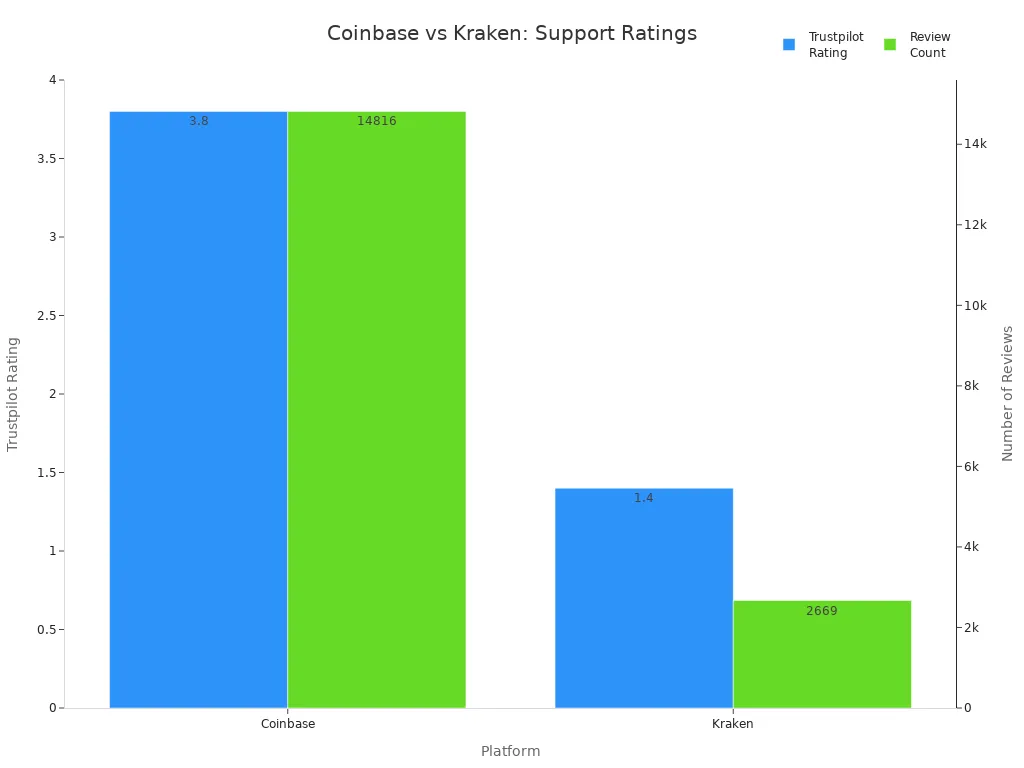
Note: If you want fast, expert help, kraken stands out. If you want easy to use support for simple questions, coinbase is a good choice.
Fees and Costs: Kraken vs Coinbase
Trading Fees
You want to know how much it costs to trade on each platform. Both kraken and Coinbase use a maker-taker fee structure. This means you pay different fees depending on whether you add liquidity (maker) or take liquidity (taker) from the market. For most users, kraken offers lower fees, especially if you trade a lot.
Kraken starts with maker fees at 0.25% and taker fees at 0.40% for a 30-day trading volume between $0 and $10,000. If you trade more, your fees drop. At the highest volume levels, kraken reduces maker fees to 0% and taker fees to 0.10%. For futures trading, kraken charges even less, with maker fees as low as 0.02% and taker fees down to 0.01%. Kraken also has special rates for stablecoin and FX pairs, starting at 0.2% and dropping to almost zero for high-volume traders.
Coinbase uses a similar tiered system. For spot trading, maker fees range from 0.0% to 0.40%, and taker fees go from 0.05% to 0.60%. Coinbase applies the same fee structure to both spot and futures trading. If you trade stablecoin pairs, you pay no maker fees and taker fees between 0.1% and 0.3%, depending on your trading tier. Coinbase also offers a subscription called Coinbase One. For about $30 per month, you get zero trading fees up to $10,000 in trades each month.
You will notice that kraken usually gives you lower fees, especially if you trade more than $50,000 per month. Both platforms calculate your trading volume over 30 days. They also charge network transaction fees separately when you move crypto off the platform.
Tip: If you plan to trade often or in large amounts, kraken’s lower fees can save you a lot of money over time.
Deposit & Withdrawal Fees
You need to know how much it costs to move money in and out of your account. Both kraken and Coinbase offer free ACH withdrawals, which is great if you use a US bank account. For wire withdrawals, kraken charges between $4 and $35, while Coinbase charges a flat $15. Deposit fees are not always clear, but both platforms may charge fees set by your funding provider.
Here is a quick table to help you compare deposit and withdrawal fees:
Payment Method | Kraken Fees | Coinbase Fees |
|---|---|---|
ACH Withdrawal | Free | Free |
CBIT Withdrawal | Free | N/A |
Wire Withdrawal | $4 to $35 | $15 |
Deposit Fees | Not explicitly detailed | Not explicitly detailed |
If you use a credit or debit card, Coinbase charges up to 3.99% per transaction. Kraken charges 3.75% plus $0.25. Both platforms pass on blockchain network fees when you withdraw crypto. These fees depend on the network and can change based on congestion.
Note: Always check the latest deposit and withdrawal fees before you transfer money. Some fees may change without notice.
Other Costs
You may face other costs when you use kraken or Coinbase. Neither platform charges inactivity or account maintenance fees. You do not pay to open an account. Both platforms charge network fees when you withdraw crypto. These fees cover the cost of putting your transaction on the blockchain.
Kraken does not charge for most crypto deposits, but some exceptions exist. Cash deposit and withdrawal fees depend on your funding provider. If you use instant buy, kraken charges a spread and payment fee. Unsupported asset recovery fees may apply if you send the wrong coin to your account.
Coinbase charges network (gas) fees when you transfer crypto. You also pay a spread fee on buy and sell transactions. Coinbase One costs $29.99 per month and removes trading fees up to $10,000 in trades. ATM withdrawals have no Coinbase fee, but the ATM operator may charge you. NFT purchases do not have extra Coinbase fees, but you still pay blockchain transaction costs.
Fee Type | Kraken Details | Coinbase Details |
|---|---|---|
Inactivity Fees | None charged | None charged |
Account Maintenance Fees | None charged | None charged |
Crypto Withdrawal Fees | Charged to cover blockchain network fees | Charged when transferring crypto; depends on blockchain congestion |
Crypto Deposit Fees | Mostly free, some exceptions | Mostly free |
Instant Buy Payment Fees | Spreads and payment fees apply | Spread fees applied on buy/sell transactions |
Subscription Fees | None | $29.99/month for Coinbase One |
ATM Withdrawal Fees | N/A | No Coinbase fees, but ATM operator may charge |
NFT Purchase Fees | N/A | No extra Coinbase fees, but blockchain transaction costs apply |
Unsupported Asset Recovery | Charged based on complexity, communicated before recovery | N/A |
Tip: Always review all possible fees before you make a transaction. Some costs, like network fees or spreads, may not be obvious at first.
Cost Comparison
You want to know which platform gives you the best value. Kraken usually offers lower fees for most trades. If you use kraken pro, you pay between 0.00% and 0.25% as a maker and 0.10% to 0.40% as a taker. Coinbase charges between 0.00% and 0.40% for maker trades and 0.05% to 0.60% for taker trades. For instant buy and sell, kraken charges 0.9% to 1.5%, while Coinbase can charge up to 3.99%.
High-volume traders benefit most from kraken’s lower fees. If you trade more than $50,000 per month, your fees drop below 0.2%. Kraken does not require a subscription for these rates. Coinbase offers its lowest fees only to users who trade over $500,000 per month or who pay for Coinbase One. For most retail users, Coinbase charges higher fees, plus spreads that increase your total cost.
Deposit and withdrawal fees are similar for both platforms, but kraken supports more fiat currencies. Wire withdrawals cost more on kraken, but ACH withdrawals are free on both. Card deposit fees are higher on Coinbase. Kraken’s spreads are tighter, usually around 0.3%, while Coinbase spreads range from 0.5% to 1%.
Here is a summary table to help you compare total costs:
Cost Type | Kraken | Coinbase |
|---|---|---|
Maker Fees | 0.00% – 0.25% | 0.00% – 0.40% |
Taker Fees | 0.10% – 0.40% | 0.05% – 0.60% |
Instant Buy/Sell Fees | 0.9% – 1.5% | Up to 3.99% |
Wire Withdrawal Fees | $4 – $35 | $15 |
ACH Withdrawal Fees | Free | Free |
Card Deposit Fees | 3.75% + $0.25 | Up to 3.99% |
Spread | ~0.3% | 0.5% – 1% |
Subscription Option | None | $29.99/month for Coinbase One |
Staking/Earn Fees | Lower fees | Higher fees |
You will find kraken more cost-effective if you trade often or in large amounts. Beginners may prefer Coinbase for its simple design, but you pay higher fees for that convenience. Advanced users and high-volume traders save more with kraken’s lower fees and flexible fee structure.
Note: If you want to keep your costs low, kraken is the better choice for most users.
Which Platform Is Best?
For Beginners
If you are new to crypto, you want a platform that is easy to use and helps you learn. Coinbase gives you a simple design and many tutorials. You can find step-by-step guides and videos right on the platform. Kraken also offers a clean interface and good educational resources, but coinbase stands out for beginners. The table below shows how top exchanges compare for new users:
Platform | Ease of Use | Educational Resources | Key Features for Beginners |
|---|---|---|---|
Coinbase | Straightforward | Extensive tutorials, guides | Simple buying, strong security features |
Kraken | Simple, dependable | Market insights, guides | Covers basics, good for learning |
Tip: If you want to start quickly and learn as you go, coinbase is your best choice.
For Advanced Users
Advanced users often want more trading tools and lower fees. Kraken gives you margin, futures, and spot trading. You can access deep market data and advanced order types. Kraken supports over 200 cryptocurrencies and many fiat currencies. Kraken vs. coinbase shows that kraken offers more for professional traders. You get lower fees as your trading volume grows. Coinbase has advanced features, but kraken’s tools and flexibility make it the top pick for experienced users.
Kraken offers:
Margin and futures trading
Advanced charting tools
Lower fees for high-volume trades
For Security
You want to keep your assets safe. Both kraken and coinbase use strong security features like two-factor authentication and cold storage. Kraken stands out with regular proof-of-reserves audits and a strong record of no major breaches. Coinbase gives you insurance for your US dollar balance and crime insurance for digital assets. Kraken vs. coinbase shows that kraken focuses more on transparency and user control, while coinbase adds extra insurance. If you want to check your funds and trust in platform audits, kraken is the safer choice.
For Low Fees
If you care most about saving money, you should look at trading fees and other costs. Kraken usually offers lower fees, especially for frequent or high-volume traders. The table below compares the main options for low fees:
Platform | Maker Fee | Taker Fee | Notes on Fee Benefits |
|---|---|---|---|
Kraken Pro | 0.16% | 0.26% | Fees drop to 0% maker/0.10% taker at high volume |
Coinbase One | $0 (up to $10k trades) | $0 (up to $10k trades) | $29.99/month subscription |
Kraken does not require a subscription for low fees. Coinbase offers zero fees only with a paid plan and up to a limit. Kraken vs. coinbase makes kraken the better choice for most users who want to keep costs down.
Note: If you trade often or in large amounts, kraken helps you save more on fees.
You have seen that Coinbase gives you strong security, easy onboarding, and a simple interface, while Kraken offers lower fees and advanced trading tools. Here is a quick summary:
User Type | Best Choice | Why |
|---|---|---|
Beginners | Coinbase | |
Advanced Traders | Kraken | Lower fees, margin, futures, pro tools |
Security-Focused | Both | Cold storage, 2FA, strong compliance |
Cost-Sensitive | Kraken | Lower trading fees, volume discounts |
Think about what matters most to you—ease of use, low fees, or advanced features. For more details, explore guides on each platform’s website or check their latest updates on trading and security.
FAQ
Is my money safe on Coinbase and Kraken?
Both Coinbase and Kraken use strong security. You get two-factor authentication and cold storage for your crypto. Kraken runs regular audits. Coinbase offers insurance for U.S. dollar balances. Always use strong passwords and enable all security features.
Which platform is faster for getting started?
You can start trading on Coinbase in under a minute with basic info. Kraken takes about 10 minutes because you need to upload an ID and pass a liveness check. If you want speed, Coinbase is the quicker choice.
Do I pay hidden fees on either exchange?
You see most fees up front. Both platforms charge trading, withdrawal, and sometimes spread fees. You may pay network fees when moving crypto. Always check the fee schedule before you trade or transfer funds.
Can I switch from Coinbase to Kraken easily?
Yes, you can move your crypto from Coinbase to Kraken. First, create a Kraken account. Then, withdraw your assets from Coinbase and deposit them into Kraken. Double-check wallet addresses to avoid mistakes.
What if I need help with my account?
You get 24/7 support on both platforms. Kraken offers live chat with real people. Coinbase uses chatbots for most questions, but you can reach a human for urgent issues. For fast help, Kraken usually responds quicker.
Tip: Always contact support through official websites to avoid scams.

