
You might wonder, how long does it take for bitcoin to transfer? Most bitcoin transfers finish in about 10 minutes to 1 hour, but sometimes the wait can change a lot. On July 7, 2025, the average bitcoin confirmation time was 11.47 minutes. That was much faster than the day before, which saw 31.28 minutes, and much quicker than a year ago, when it was 976.29 minutes. When you send and receive bitcoin, the speed depends on network congestion, fees, and how many confirmations you need. Many people ask, how long do crypto transfers take? The answer can shift daily. If you want to send and receive bitcoin with less wait, you should learn what affects the speed. When you check how long does it take for bitcoin to transfer, you will see that how long do crypto transfers take can surprise you.
Key Takeaways
Bitcoin transfers usually take between 10 minutes and 1 hour, depending on network activity and fees.
Paying higher transaction fees helps your bitcoin move faster because miners prioritize those payments.
Network congestion can slow down transfers, so sending bitcoin during off-peak times can speed things up.
Using tools like the lightning network or internal exchange transfers can make bitcoin payments almost instant.
Checking platform rules and using wallets with features like Replace-By-Fee lets you control and improve transfer speed.
How Long Does It Take for Bitcoin to Transfer
Average Bitcoin Transaction Times
When you ask, “how long does it take for bitcoin to transfer,” you usually want a clear answer. Most bitcoin transactions finish in about 10 minutes to 1 hour. This range comes from how the bitcoin network works. Each block on the bitcoin blockchain takes about 10 minutes to create. When you send and receive bitcoin, your transaction waits to be included in one of these blocks. If the network is busy, your transaction might wait longer.
Bitcoin’s block time is about 10 minutes. This sets the basic speed for most bitcoin transactions.
Most transactions get their first confirmation in about 10 minutes.
Many platforms want more than one confirmation before they let you use your bitcoin. Six confirmations, which is common, take about one hour.
If the network gets crowded, or if you pay a low fee, your transaction might take longer.
You can see these facts in many technical records and studies about bitcoin. The average bitcoin transaction time can change each day. Sometimes, it takes just a few minutes. Other times, it can take hours or even a whole day. When you wonder, “how long do crypto transfers take,” you should know that bitcoin transfer time depends on many things.
Tip: If you want your transaction to finish faster, try sending it when the network is less busy or pay a higher fee.
What Affects How Long It Takes to Send Bitcoin
Several things decide how long it takes to send and receive bitcoin. The main factors are block time, the number of confirmations, transaction fees, and platform rules. Each one plays a big part in the speed of your bitcoin transactions.
Aspect | Statistic | Value | Interpretation |
|---|---|---|---|
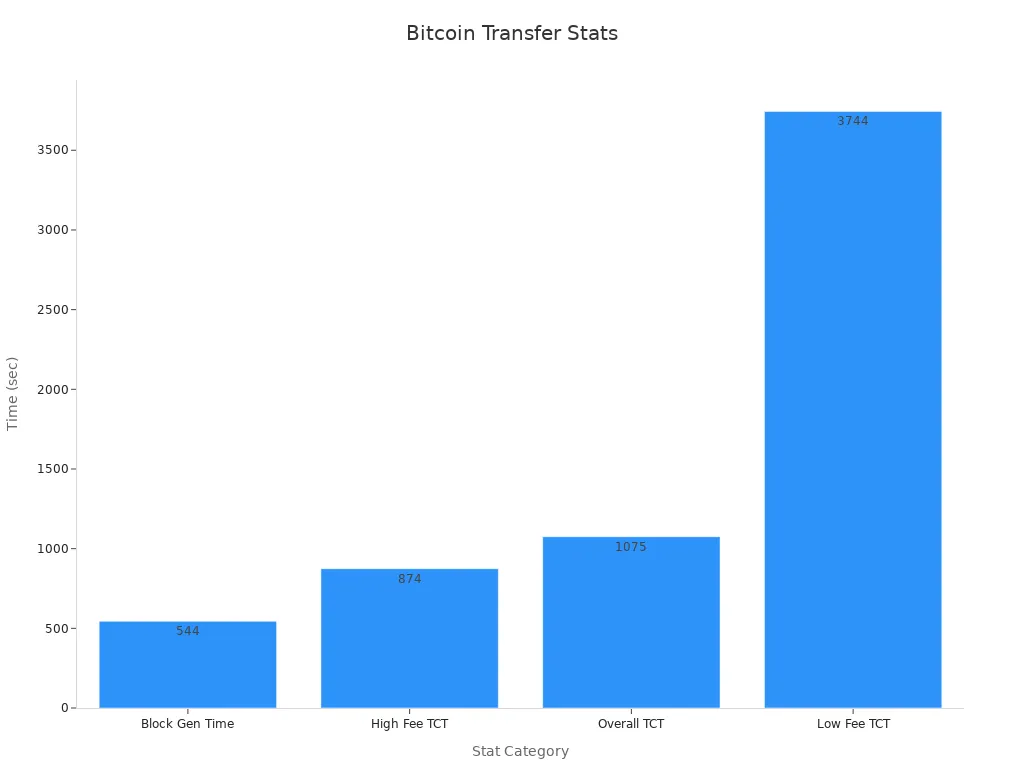
Block Generation Time | Mean | ~544 seconds | Average time to generate a block, influencing confirmation speed |
Block Generation Time | Variance | High (2.9 × 10^5) | Shows that block times can change a lot |
Transaction Count per Block | Mean | ~529 transactions | More transactions per block can slow things down |
Transaction Fees | Frequency Distribution | 0 to 10 BTC, most are low | Higher fees mean faster processing |
Confirmation Time (High Fee) | Mean | ~874 seconds | High fees get you faster confirmation |
Confirmation Time (Low Fee) | Mean | ~3,744 seconds | Low fees make you wait longer |
Confirmation Time (Overall) | Mean | ~1,075 seconds | Average confirmation time for all transactions |
When you send a bitcoin transaction, it joins a queue. Miners pick which transactions to include in the next block. They usually choose the ones with higher fees first. If you pay a low fee, your transaction might wait in the queue for a long time. This is why transaction speed can change so much.
Different platforms also have their own rules. Some exchanges, like Binance, want two confirmations before you can use your bitcoin. Others, like Kraken, want three. These rules can add extra time to your bitcoin transfer.
Here are the main things that affect how long do crypto transfers take:
Block time: Each block takes about 10 minutes to create.
Number of confirmations: More confirmations mean more waiting.
Transaction fees: Higher fees get you faster service.
Network congestion: More transactions in the queue slow things down.
Platform policies: Some platforms need more confirmations than others.
When you want to send and receive bitcoin, you should check these factors. They help you understand how long does it take for bitcoin to transfer. If you want to know how long do crypto transfers take for other coins, you should look at their own rules and network speeds. Bitcoin transactions can be fast or slow, but you can control some parts of the process. Always check the network and fee levels before you send.
Bitcoin Transactions
How Bitcoin Transactions Work
You start a bitcoin transaction by entering the recipient’s wallet address and the amount you want to send. Your digital wallet creates a private-public key pair. You use your private key to sign the transaction, which proves you own the bitcoin. The transaction then moves to the bitcoin network, where it waits in a pool called the mempool.
Miners collect these transactions and group them into blocks. They compete to solve a cryptographic puzzle, which is part of the Proof-of-Work system. The first miner to solve the puzzle adds the block to the blockchain. This process makes your transaction public and permanent.
Here is a simple overview of the steps:
Step | Description |
|---|---|
1 | You create a transaction with the receiver’s address and amount. |
2 | You sign the transaction with your private key. |
3 | The transaction joins the mempool and waits for miners. |
4 | Miners validate and add the transaction to a new block. |
5 | The block joins the blockchain, confirming your transaction. |
A technical report on bitcoin transactions describes a dataset with millions of nodes and edges, showing how transactions connect people and organizations. Each transaction has inputs and outputs, forming a chain of ownership. This structure helps keep the network secure and transparent.
Confirmations and Security
After miners add your transaction to a block, the network gives it a confirmation. Each new block added after yours counts as another confirmation. Most platforms require three to six confirmations for high-value transactions. More confirmations make it harder for anyone to reverse your transaction.
Note: Each confirmation increases security and helps prevent double-spending. The standard of six confirmations comes from the high cost of reversing multiple blocks.
The number of confirmations you need depends on the transaction amount. For small amounts, one confirmation may be enough. For larger amounts, you should wait for more. Here is a quick guide:
Transaction Amount (USD) | Recommended Confirmations | Approximate Time |
|---|---|---|
Less than $1,000 | 1 | 10-20 minutes |
$1,000 to $10,000 | 3 | 30-60 minutes |
$10,000 to $1,000,000 | 6 | 60-120 minutes |
Over $1,000,000 | More than 6 | Varies |
Bitcoin transactions rely on confirmations to protect both sender and receiver. The more confirmations, the safer your transaction becomes. This system keeps bitcoin secure, even if the network faces attacks. If you want faster confirmations, you can pay higher fees or use special features on some platforms.
Transfer Speed Factors
Network Congestion
Network congestion is one of the main factors affecting transaction speed for bitcoin transactions. When many people send transactions at the same time, the network gets crowded. You might see the mempool, which is the waiting area for unconfirmed transactions, fill up quickly. This causes delays because only a limited number of transactions fit into each block.
Transaction counts per block can jump from 1,000 to 8,000, making some blocks take over 1,400 seconds to confirm.
The mempool size goes up and down, showing how transactions pile up and then get processed.
When congestion rises, average fee rates can spike from 1.6 units to 2.8 units.
The introduction of BRC-20 tokens made congestion worse, leading to higher fees and longer wait times.
During busy times, you may notice your transaction stays in the mempool longer, waiting for confirmation.
You can see that network congestion slows down bitcoin transactions and makes transaction speed less predictable.
Transaction Fees
Transaction fees play a big role in how fast your bitcoin transactions get confirmed. Miners choose which transactions to include in the next block, and they usually pick the ones with higher fees first. If you want your transaction to move quickly, you can pay a higher fee.
A study found that when you pay more, your transaction often gets confirmed faster, especially during busy times. Miners use fee estimators and mempool data to decide which transactions to process. If you set a low fee, your transaction might wait a long time. Some wallets let you use Replace-by-Fee (RBF) to increase your fee after sending, which can help speed things up.
Platform Processing
Platform policies also affect how fast your bitcoin transactions go through. Some exchanges or wallets have their own rules for processing transactions. For example, they may require more confirmations before you can use your bitcoin. Some platforms offer priority options or use sidechains like Liquid Network or Rootstock, which can confirm transactions in about 33 seconds. These tools help you get faster service, but you may need to trust the platform more.
Tip: If you want to improve your transaction speed, try sending bitcoin during off-peak hours or use platforms that offer faster processing options.
Bitcoin transactions depend on several factors affecting transaction speed. By understanding network congestion, transaction fees, and platform processing, you can make smarter choices and enjoy quicker cryptocurrency transactions.
How to Make Bitcoin Transfers Faster

If you want to make your bitcoin transfers faster, you can use several proven strategies. These methods help you avoid long waits and get your funds where they need to go quickly. Here are the best ways to boost your transaction speed optimization and enjoy efficient transfers.
Use Higher Fees
You can speed up cryptocurrency transactions by paying higher fees. When you send bitcoin, miners look for transactions with the best rewards. They pick the ones with higher fees first. If you set a higher fee, your transaction jumps ahead in the queue. This is the fastest way to send bitcoin during busy times.
Miners always want to maximize their earnings. When the network gets crowded, fees go up. A study shows that as more people use bitcoin, fees rise in a non-linear way. If you pay more, your transaction often gets confirmed in the next block, sometimes in just 10 minutes. Wallets with dynamic fee calculators help you choose the right fee based on real-time network conditions.
Tip: Use a non-custodial wallet. These wallets let you control your fees and use features like Replace-By-Fee (RBF). If your transaction gets stuck, you can resend it with a higher fee to speed things up.
Try the Lightning Network
The lightning network is a layer 2 solution that makes instant bitcoin transfers possible. You can use it for small or frequent payments. The lightning network works by creating payment channels between users. You only need two on-chain transactions: one to open the channel and one to close it. All other payments happen off-chain, which means they do not slow down the main bitcoin network.
Empirical studies show that the lightning network reduces congestion and lowers fees. If everyone used the lightning network in 2017, congestion could have dropped by 84%. This means you get faster payments and lower costs. Lightning network innovations keep making it easier to use, and many wallets now support it. You can send and receive bitcoin almost instantly, making it the fastest way to send bitcoin for many users.
Note: The lightning network is best for quick, low-cost payments. For large transfers, you may still need to use the main bitcoin blockchain.
Choose the Right Time
You can also improve your transfer speed by picking the best time to send bitcoin. Network congestion changes throughout the day. Early mornings and weekends usually have less traffic. If you send bitcoin during these off-peak hours, your transaction will likely confirm faster and cost less.
Transaction speeds go up when the network is busy, like during price surges or big events.
Off-peak times mean fewer people are sending bitcoin, so your transaction gets processed quickly.
Paying a higher fee during these times almost guarantees confirmation in the next block.
You can use tools like fee estimators to check current network congestion. These tools help you set the right fee and avoid delays. If you want to speed up cryptocurrency transactions, always check the network before you send.
Use Exchange Internal Transfers
If you use a trading platform, you can take advantage of internal transfers. These transfers move bitcoin between accounts on the same exchange. They do not need blockchain confirmations, so they happen almost instantly. This is a great way to get fast results when you and the recipient both use the same platform.
Market studies and exchange reports show that modern trading systems process orders in milliseconds. Internal transfers use the same technology. You get your bitcoin right away, with no waiting for miners or network confirmations. This method is especially useful for moving funds between your own accounts or sending bitcoin to friends who use the same exchange.
Tip: Always check if your platform offers internal transfers. This can save you time and fees.
Extra Tips for Faster Bitcoin Transfers
Use Segregated Witness (SegWit) wallets. These wallets make your transactions smaller and faster.
Track your transaction with a blockchain explorer. You can see where your transfer is in the process.
Avoid low-fee mistakes. If you set your fee too low, your transaction might get stuck for hours or even days.
Try the liquid network or other layer 2 solutions like the lightning network for even more options. The liquid network can confirm transfers in about 33 seconds, making it one of the fastest ways to move bitcoin.
Method | Speed | Best For |
|---|---|---|
Higher Fees | 10-60 min | Any transfer during congestion |
Lightning Network | Seconds | Small, frequent payments |
Off-Peak Hours | 10-20 min | Any transfer |
Exchange Internal Transfers | Instant | Same-platform transfers |
Liquid Network | ~33 seconds | Fast, secure transfers |
By following these tips, you can enjoy instant bitcoin transfers and avoid long waits. The right strategy depends on your needs, but you always have options for transaction speed optimization. Whether you use the lightning network, the liquid network, or just pay a higher fee, you can find the fastest way to send bitcoin and make your experience smoother.
You can make bitcoin transfers faster by using higher fees, choosing off-peak times, or trying the lightning network. Understanding how bitcoin works helps you avoid delays and use the right tools. Research shows that bitcoin will keep improving as Layer-2 solutions grow. By 2050, bitcoin could handle more trades worldwide with thousands of new channels and networks. You can expect bitcoin to become even quicker and more useful in daily life. Try these tips to enjoy smoother bitcoin transactions.
FAQ
How long does it take for bitcoin to transfer during busy times?
You might wait from 10 minutes to several hours. Bitcoin transfer time depends on network congestion, transaction fees, and the number of confirmations. If you want faster confirmations, try sending during off-peak hours or use higher fees for transaction speed optimization.
What is the fastest way to send bitcoin?
You can use the lightning network for instant bitcoin transfers. This layer 2 solution lets you send small payments in seconds. For large amounts, paying higher fees or using the liquid network can help you achieve efficient transfers and reduce average confirmation time.
How can I speed up cryptocurrency transactions if my transfer is stuck?
You can use Replace-by-Fee (RBF) to increase your fee and speed up cryptocurrency transactions. Some wallets support this feature. You may also try the lightning network or liquid network for faster bitcoin transaction confirmation and improved bitcoin transaction times.
Do all platforms have the same bitcoin transaction times?
No, each platform sets its own rules for bitcoin transaction confirmation. Some require more confirmations than others. These factors affecting transaction speed can change your average bitcoin transaction time. Always check your platform’s policy before sending cryptocurrency transactions.
Are there any new technologies for faster bitcoin transfers?
Yes! Lightning network innovations and other layer 2 solutions like the liquid network help you get instant bitcoin transfers. These tools reduce congestion and make bitcoin transfer time much shorter. You can expect even more efficient transfers as technology improves.

