

You may wonder how long does bitcoin take to send in 2025. Most people see a bitcoin transfer take about 10 minutes, but sometimes it can stretch to over an hour. You might notice that sending and receiving bitcoin depends on network congestion, transaction fees, wallet type, block size, and confirmation requirements. If you want to transfer bitcoins quickly, set clear expectations and choose smart options. Sending and receiving bitcoin can be faster when you pick the right tools. When you ask how long does it take to send bitcoin, remember each transaction is unique. If you transfer bitcoins often, you will learn how long does bitcoin take to send in different situations.
Key Takeaways
Bitcoin transactions usually take about 10 minutes but can take longer during busy times or with low fees.
Paying higher transaction fees and sending during off-peak hours can speed up your Bitcoin transfers.
Using wallets that support features like SegWit, Replace-By-Fee (RBF), and the Lightning Network helps make transactions faster and cheaper.
Network congestion and the number of confirmations required affect how long your transaction takes to complete.
If your transaction gets stuck, tools like RBF and Child-Pays-for-Parent (CPFP) can help speed it up, and checking mempool data before sending can prevent delays.
How Long Does Bitcoin Take to Send
Average Time for a Bitcoin Transfer
You may want to know how long does bitcoin take to send in 2025. The answer depends on several factors, but you can usually expect a bitcoin transaction to take about 10 minutes. Sometimes, it can take over an hour if the network is busy or if you use a low fee. The average time for a bitcoin transfer has changed because of network congestion and higher transaction fees. In 2025, blocks often stay full, and the mempool can have over 460,000 transactions waiting. This backlog means you might wait longer, especially during peak times.
Tip: If you want to transfer bitcoins quickly, try to send your transaction when the network is less crowded. You can check bitcoin transaction time using online mempool trackers.
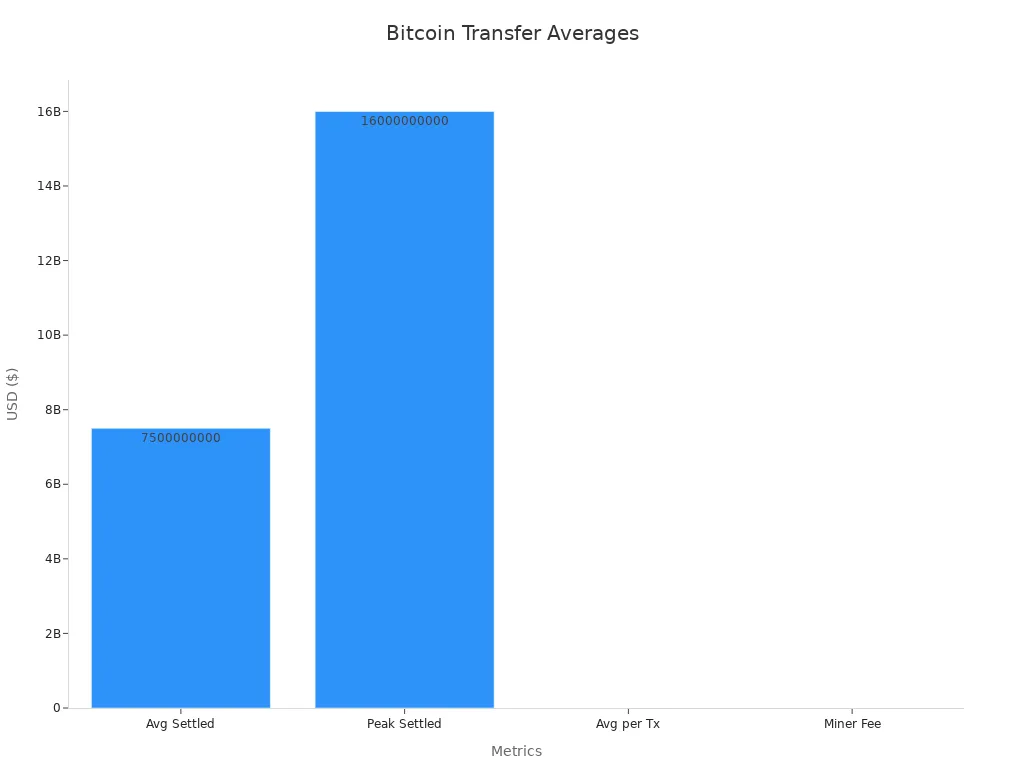
The table below shows some important numbers for bitcoin transactions in 2025:
Metric / Cohort | Numerical Average / Value (2025) | Notes / Trend Description |
|---|---|---|
Average daily settled volume | $7.5 billion | Yearly average settled per day despite contraction in transaction counts |
Peak daily settled volume | $16 billion | Peak during $100k ATH price break in Nov 2024 |
Average volume per transaction | $36,200 | Indicates fewer but higher-value transactions |
Share of network volume > $100k | 89% | Increased dominance of large transactions in 2025 |
Share of network volume ≤ $100k | 11% | Structural decline in smaller transaction volume share |
Sub-cohort volume shares | $0-$1k: 0.9%, $1k-$10k: 2.1%, $10k-$100k: 7.9% | All sub-cohorts show meaningful decline in volume share |
Average miner revenue from fees | $558,000 per day | Fee pressure at historical lows, indicating reduced block-space demand and congestion |
Daily transaction count (2025) | 320,000 to 500,000 | Marked contraction from previous highs, reflecting network throughput changes |
You can see that most bitcoin transactions now involve large amounts. Smaller transactions make up a much smaller share of the network. This shift affects how long does bitcoin take to send, especially if you want to transfer bitcoins in small amounts.
What Affects Bitcoin Transaction Time
Many things can change how fast your bitcoin transaction goes through. You need to understand these factors if you want to estimate bitcoin transaction times or speed up sending and receiving bitcoin. Here are the main things that affect bitcoin transaction times in 2025:
Network congestion can slow down transactions. When many people send bitcoin at once, the mempool fills up, and miners pick transactions with higher fees first.
Transaction fees matter a lot. If you pay a higher fee, miners will likely confirm your transaction faster. Low fees can leave your transaction waiting for a long time.
The number of confirmations you need will change the total time. Some services need only one confirmation, but others may ask for three or more.
Wallet type makes a difference. Non-custodial wallets let you set your own fees and sometimes speed up your transaction. Custodial wallets may use default fees that do not match current network conditions.
Miner availability and competition can affect how quickly new blocks get added. Fewer miners mean slower block creation, while more competition can push up fees.
Transaction size also matters. Bigger transactions take up more space and cost more. Using Segregated Witness (SegWit) can help reduce the size and speed up confirmation.
Time of day can play a role. Off-peak hours often mean less congestion and faster processing.
New technology like SegWit, Replace-By-Fee (RBF), the Lightning Network, Taproot, and layer-2 solutions can help you get faster and cheaper transactions.
If you want to check bitcoin transaction time before you send, look at the current mempool size and fee rates. You can use tools that show real-time data to help you decide when to transfer bitcoins. Remember, bitcoin transaction time can change quickly, so always check before sending.
Bitcoin Transaction Process

Steps That Impact Speed
When you send a bitcoin transaction, several steps can affect how fast it moves through the network. Each step can add to the total time it takes to transfer bitcoins. Here are the main steps that impact speed:
You start by creating a transaction in your wallet. If you use a wallet or exchange, sometimes there are internal delays before your transaction even reaches the network.
Your wallet broadcasts the transaction to the bitcoin network. Network congestion can slow this step, especially when many people send transactions at once.
The transaction enters the mempool, which is a waiting area for unconfirmed transactions. If the mempool is full, your transaction may wait longer.
Miners pick transactions from the mempool. They usually choose transactions with higher fees first. If you set a low fee, your transaction might get stuck or delayed.
Limited block space means only a certain number of transactions fit in each block. When blocks fill up, some transactions must wait for the next block.
Incorrect transaction details can cause delays or even failures, so always double-check before sending.
Tip: You can speed up your bitcoin transaction by setting a higher fee and using wallets that let you adjust fees after sending. Some wallets support Replace-By-Fee (RBF), which helps if your transaction gets stuck.
Confirmations Explained
A confirmation happens when miners include your bitcoin transaction in a new block. Each new block added to the blockchain counts as one confirmation. Most services require at least 6 confirmations before they consider a bitcoin transaction fully secure. The confirmation time depends on several factors, including network congestion and the fee you pay.
Higher fees encourage miners to confirm your transaction faster.
If the network is busy, the mempool grows, and confirmation times increase.
You can use Segregated Witness (SegWit) addresses to make your transaction smaller and faster.
Layer-2 solutions like the Lightning Network allow you to transfer bitcoins almost instantly, skipping the usual confirmation process.
Real-time tools, such as blockchain explorers and fee estimators, help you track recent confirmation times and choose the best moment to send your transaction.
Note: If your transaction takes too long, you can use RBF to increase the fee and speed up confirmation.
A table below shows how confirmation requirements affect transaction speed:
Number of Confirmations | Typical Use Case | Impact on Speed |
|---|---|---|
1 | Small transfers, wallets | Fast, but less secure |
3 | Exchanges, merchants | Moderate speed and safety |
6 | Large transfers, savings | Slowest, most secure |
You can optimize your bitcoin transaction by understanding how each step and confirmation affects the total time. This knowledge helps you transfer bitcoins faster and avoid common delays.
Factors Influencing Bitcoin Transaction Time
Network Congestion
You might notice that network congestion is one of the biggest factors affecting transaction speed. When many people send bitcoin at the same time, the network becomes crowded. The mempool, which holds unconfirmed transactions, fills up quickly. Miners can only include a limited number of transactions in each block. If the mempool grows large, your transaction may wait longer before confirmation.
During busy periods, such as price surges or major events, network congestion can spike. This leads to longer wait times for transactions. In 2025, studies show that mempool size and block intervals have a direct impact on how quickly your transaction gets confirmed. If you want to avoid delays, try sending bitcoin when the network is less busy.
Tip: Use mempool trackers to check current network congestion before you send your transaction.
Transaction Fees
Transaction fees play a key role in how fast your transaction gets processed. Miners choose which transactions to include in the next block. They usually pick transactions with higher fees first. If you set a low transaction fee, your transaction may stay in the mempool for a long time.
Recent research from 2025 shows a strong link between transaction fees and confirmation time. The study used real network data and found that higher fees almost always lead to faster confirmations. The mempool size and fee-setting behavior work together to affect how long you wait. If you want your transaction to go through quickly, you should consider paying a higher fee.
A 2025 study tracked over 11,000 records and found that:
High transaction fees speed up confirmation.
Low fees can cause long delays, especially during network congestion.
Fee forecasting tools help you pick the right fee for your transaction.
Note: Wallets with dynamic fee adjustment can help you set the best transaction fee for current network conditions.
Wallet and Tools
The wallet and tools you use can change how fast your transactions get confirmed. Some wallets let you set your own transaction fees. Others use default settings that may not match the current network situation. Wallets that support SegWit or Replace-By-Fee (RBF) give you more control over speed and cost.
You can also use wallets that support the Lightning Network. This technology lets you send bitcoin almost instantly by moving transactions off the main blockchain. In 2025, many exchanges and wallets offer Lightning deposits and withdrawals. These tools help you avoid network congestion and high fees.
Wallets with Lightning Network support can process transactions in milliseconds.
SegWit wallets reduce transaction size, making it easier for miners to include your transaction in a block.
Smart contract automation in some wallets speeds up withdrawals and deposits.
Tip: Choose a wallet that lets you adjust fees and supports advanced features like SegWit and Lightning Network for faster transactions.
Block Size and Mining
Block size and mining power affect how many transactions the network can handle at once. In 2025, the average block size has grown to about 3–3.5 MB, close to the SegWit limit of 4 MB. Larger blocks can fit more transactions, which can help speed up processing during busy times.
However, bigger blocks also bring challenges. They require more computing power and bandwidth. This can slow down block propagation and increase the risk of network centralization. When blocks fill up, miners must choose which transactions to include, often based on transaction fees.
Recent mining data shows that while larger blocks can help process more transactions, they can also lead to higher fees and more network congestion. The balance between block size and network health is important for keeping transaction speeds steady.
Note: Block size changes can improve transaction speed, but they also affect network security and decentralization.
Confirmation Requirements
Confirmation requirements set how many blocks must include your transaction before it is considered final. Some wallets or services need only one confirmation, while others may require three or even six. The more confirmations you need, the longer your transaction will take.
A recent model using over 1.5 million pending transactions shows that higher confirmation requirements increase wait times. Miners always prioritize transactions with higher fees, so your fee choice also affects how quickly you reach the required number of confirmations.
One confirmation is fast but less secure.
Three confirmations offer a balance between speed and safety.
Six confirmations provide the highest security but take the most time.
Tip: For small transfers, you can use services that accept fewer confirmations to speed up your transaction.
Optimize Speed
Fee Selection
You can speed up your bitcoin transactions by choosing the right fees. The network works like a priority line. Miners pick transactions with higher fees first. If you want the fastest way to send bitcoin, always check current fee rates. Fee estimators help you see what fee will get your transaction confirmed quickly. Many wallets now offer dynamic fee adjustment, so you can set the best fee for the network at that moment.
Here is a table showing how fees affect confirmation times in 2025:
Transaction Fee Category | Mean Confirmation Time (seconds) | Priority Level | Impact on Transfer Time |
|---|---|---|---|
High Fee (H) | ~874 | High | Significantly reduced confirmation time compared to low fee |
Low Fee (L) | ~3744 | Low | Much longer confirmation time, indicating delays |
Classless (No Fee) | ~1075 | Medium | Moderate confirmation time |
You can see that higher fees lead to the fastest time a bitcoin transaction can be confirmed.
SegWit and RBF
SegWit and Replace-By-Fee (RBF) are two strategies you can use to make your transactions faster. SegWit reduces the size of your bitcoin transactions, so more fit into each block. This helps your transaction move through the network faster. RBF lets you increase the fee after sending if your transaction gets stuck. Many wallets support these features. Always use wallets that let you adjust fees and support SegWit and RBF for better speed.
Lightning Network
The Lightning Network gives you the fastest way to send bitcoin. Lightning lets you send transactions almost instantly, skipping the main blockchain. Many apps and wallets now use lightning for payments. For example:
Cash App processes one in four bitcoin payments using lightning.
Lightning transactions on Cash App grew seven times in 2024.
CoinGate saw lightning payments rise from 6.5% to 16.6% of all bitcoin payments in two years.
Lightning transactions are almost instant and use less network space.
You can use lightning for small and large payments. This network is growing fast and helps you avoid high fees and slow confirmation times.
Timing Your Transaction
You can also speed up your bitcoin transactions by picking the right time to send. The network gets busy during price surges or big events. Use fee estimators and mempool trackers to find quiet times. Sending during off-peak hours means less congestion and lower fees. Many wallets show real-time network data and help you choose the best moment. These strategies help you get your transactions confirmed faster and save on fees.
Tip: Always use wallets with dynamic fee adjustment and built-in fee estimators for the best results.
Troubleshooting
Stuck Transactions
You may notice that sometimes your transactions do not confirm as expected. Several common issues can cause transactions to get stuck or remain pending. In 2025, the most frequent reasons include:
Network congestion, which happens when too many transactions compete for limited block space.
Limits on gas price, slippage tolerance, or deadline settings in your wallet.
Bugs in smart contracts, which can lock funds permanently. For example, a bug in 2017 froze millions of dollars in digital assets.
Delays in blockchain validation, which occur if the network faces consensus problems or outages.
Regulatory freezes, such as government investigations or sanctions, which can halt transactions.
If you see your transaction stuck for a long time, check the mempool and fee rates first. Sometimes, waiting for the network to clear can resolve the issue.
Speeding Up Delays
You have several options to speed up delayed transactions. The most effective methods in 2025 are Replace-by-Fee (RBF) and Child-Pays-for-Parent (CPFP). These techniques help your transaction get picked by miners faster:
RBF lets you resend your unconfirmed transaction with a higher fee. This increases the chance that miners will include it in the next block.
CPFP allows you to create a new transaction that spends from the stuck one, adding a higher fee. Miners then process both transactions together.
Some mining pools offer transaction accelerators. These services prioritize your transaction for a fee if RBF or CPFP are not available.
Use wallets that support automatic RBF or CPFP triggers. These tools monitor mempool conditions and adjust fees as needed.
Manage your unspent outputs (UTXOs) and estimate fees accurately using live mempool data to prevent delays.
Tip: Always monitor your transaction status and use wallets with advanced fee management features.
When to Seek Help
If your transactions remain unconfirmed after using these methods, you may need extra support. You can:
Contact your wallet provider or exchange for guidance.
Use community forums or support channels to ask for advice.
Reach out to mining pool operators if you use a transaction accelerator.
Most issues resolve with patience and the right tools. If you suspect a regulatory freeze or a smart contract bug, seek expert help immediately.
You can achieve faster transactions by choosing the right wallet, setting proper fees, and using tools like SegWit or the Lightning Network. Always check network activity before sending.
Stay informed about new updates and use fee estimators for the best results.
If you follow these tips, you will save time and avoid common mistakes.
FAQ
How can you check if your Bitcoin transaction is confirmed?
You can use a blockchain explorer. Enter your transaction ID to see its status. Most explorers show the number of confirmations and the current position in the mempool.
What should you do if your Bitcoin transaction is stuck?
Try using Replace-By-Fee (RBF) or Child-Pays-for-Parent (CPFP) if your wallet supports them. These methods help speed up your transaction by increasing the fee.
Does using the Lightning Network make Bitcoin transfers instant?
Yes, the Lightning Network lets you send Bitcoin almost instantly. You avoid the main blockchain, so you do not wait for confirmations. Many wallets now support Lightning payments.
Why do some Bitcoin transactions cost more than others?
Higher fees mean faster processing.
Large or complex transactions use more space in a block.
Sending during busy times increases costs.
You can lower costs by sending at off-peak times and using SegWit addresses.

