

Bybit is a safe and easy-to-use crypto exchange, and the Bybit account creation process is straightforward. Over 15 million people trust it worldwide. It uses strong safety tools like cold wallets and 2FA. Regular checks keep your money secure while you trade. Bybit’s simple design helps both new and experienced traders.
Making a Bybit account gives you great trading tools. You can trade fast using API features. To use everything, you must finish KYC verification. This step makes your account safer and lets you use all Bybit features.
Key Takeaways
-
Making a Bybit account is fast. Use your email or phone to sign up in minutes.
-
Finish KYC checks to access features like bigger withdrawals and fiat options.
-
Create strong passwords and turn on Two-Factor Authentication (2FA) to protect your account.
-
Try Bybit’s tools like practice accounts and copy trading to improve trading skills.
-
Learn about withdrawal fees and safety tools to make secure transactions.
What is Bybit?
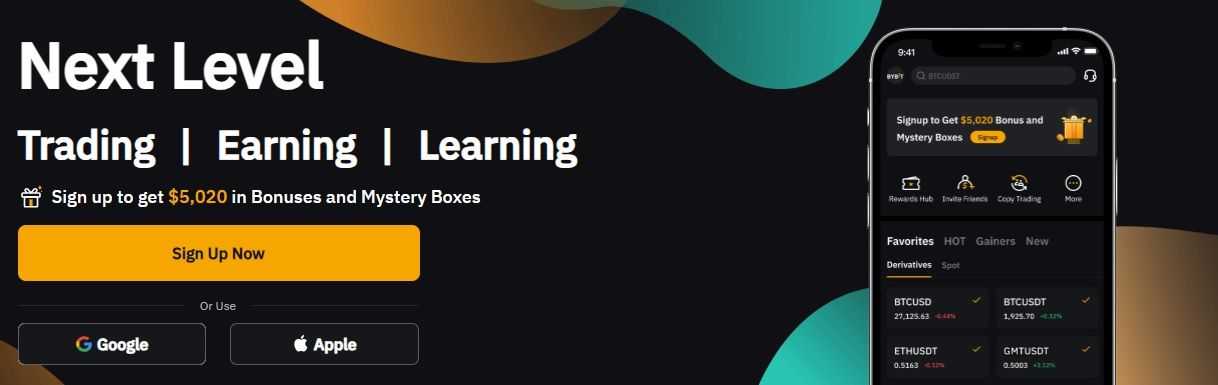
Overview of Bybit as a cryptocurrency exchange
Bybit is a top crypto exchange for all traders. It gives a safe and easy way to trade digital coins. You can use many services like spot trading and advanced tools. Bybit keeps your money safe with 2FA and cold wallets. These features protect your funds while you use the platform.
Bybit has grown a lot in recent years. For example, it now accepts Saint Kitts and Nevis passports for KYC. Since mid-2023, KYC is required, showing its focus on safety rules. These updates prove Bybit wants to be a trusted platform.
Key features and tools for traders
Bybit gives you great tools to improve trading. Its API helps you set up automatic trading plans. You can get up to 120 updates per minute for market data. Order and position checks are also fast, with limits of 60 and 120 requests per minute.
The platform is easy to use, even for hard trades. Whether you want to try leverage or copy trading, Bybit has the tools. These features make it good for both new and skilled traders.
Global reach and user base
Bybit is a big name in the crypto world. Its market share grew from 8% in late 2023 to 16% by early 2024. It passed Coinbase to become the second-largest exchange. This happened after launching Bitcoin ETFs in the US, which brought in more users.
Bybit works in over 160 countries, avoiding only about 15 risky areas. This wide reach means you can use Bybit almost anywhere. With over 15 million users, Bybit keeps growing in the crypto market.
Bybit Account Creation
How to sign up for Bybit on desktop
Making a Bybit account on your computer is easy and safe. Follow these steps to get started:
-
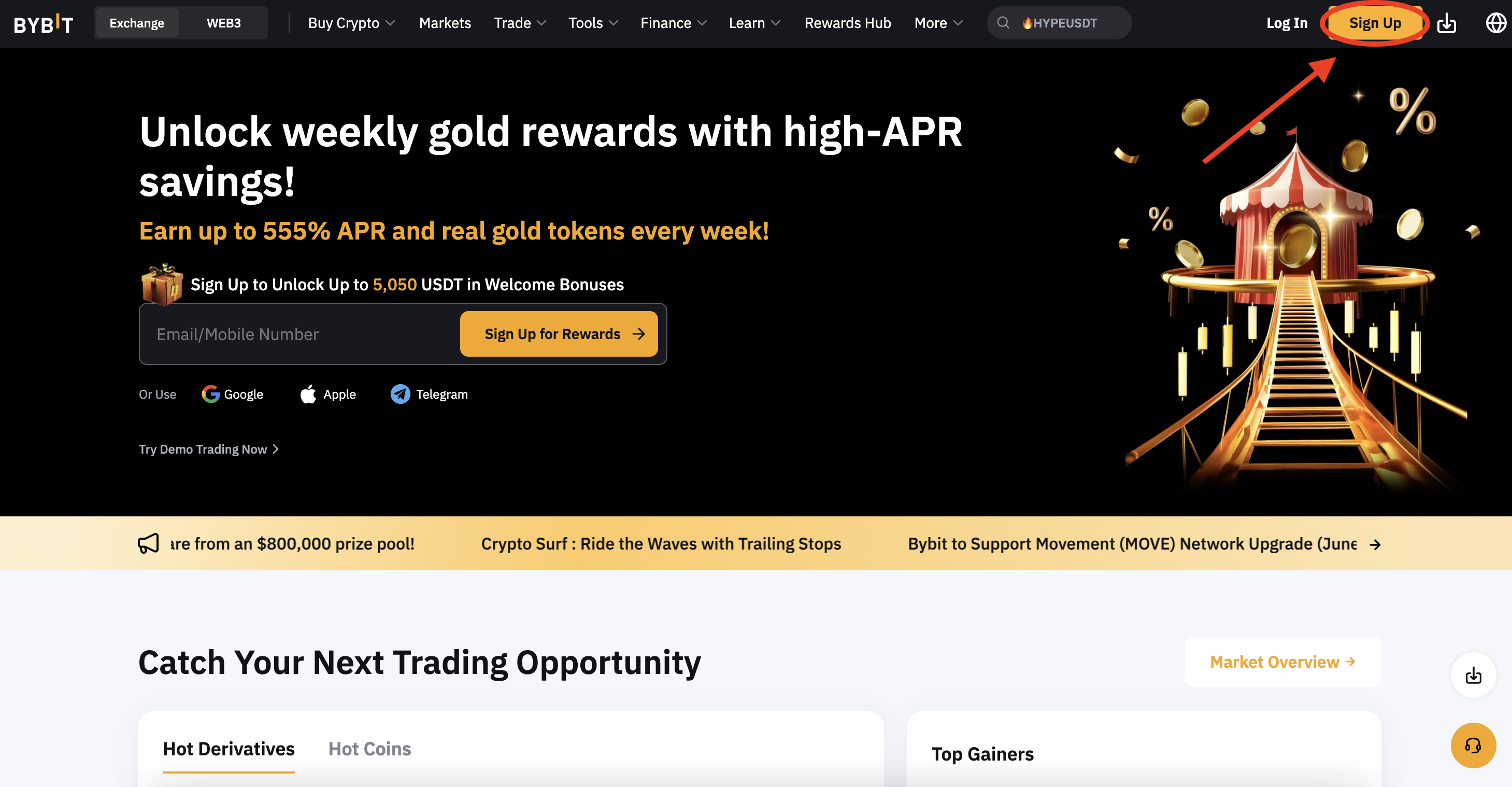
Go to the official Bybit website.
-
Find and click the ‘Sign Up’ button at the top-right corner.
-
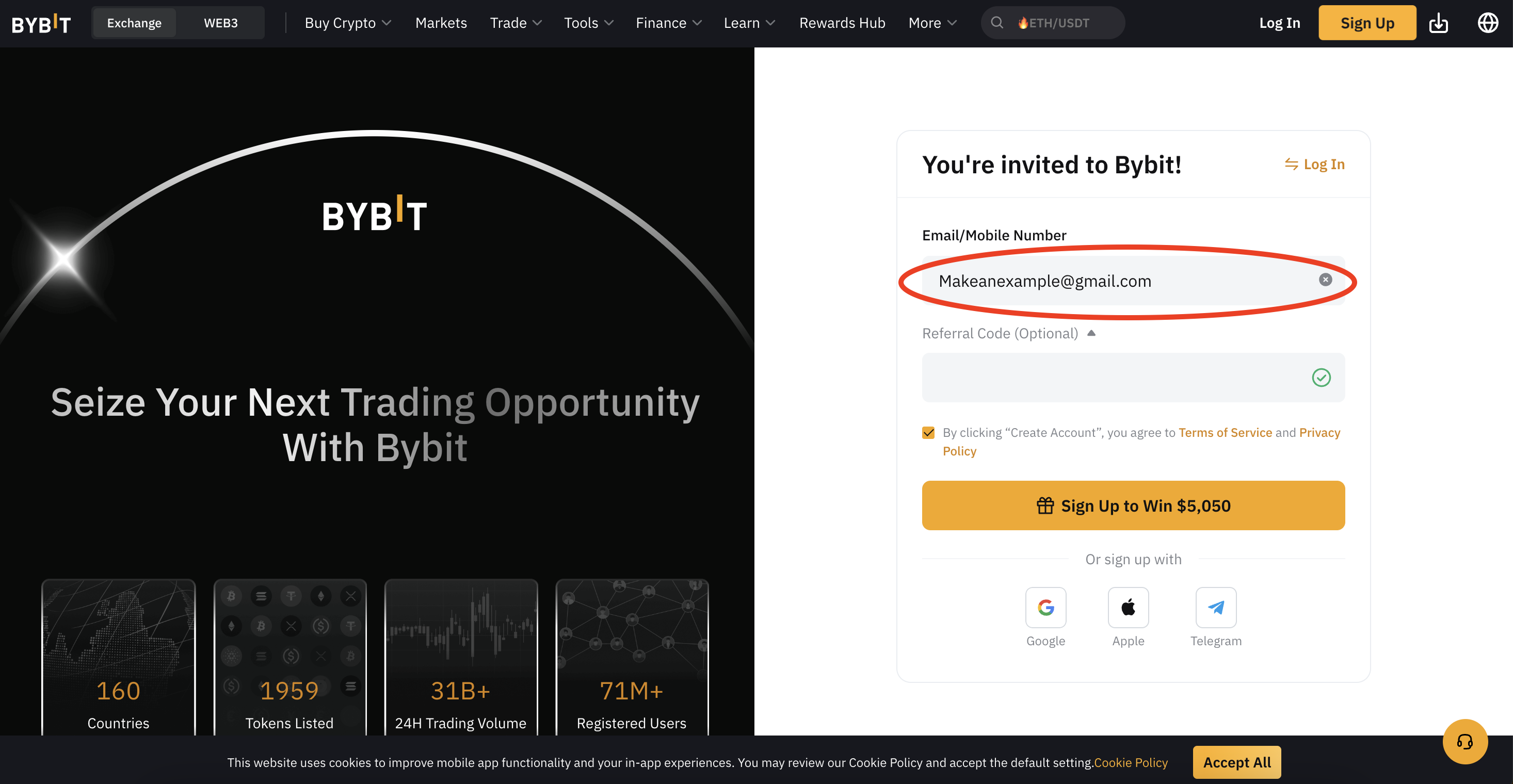
Pick to sign up with your email or phone number.
-
Fill in your email or phone and make a strong password.
-
Enter the code sent to your email or phone to verify.
Bybit keeps your account safe with advanced security tools. It uses cold wallets to store money offline, stopping hackers. Multi-signature technology and Trusted Execution Environment (TEE) also protect your funds. These features make signing up for Bybit secure and trustworthy.
How to sign up for Bybit on mobile

If you like using your phone, signing up is just as simple. Here’s how to create a Bybit account on mobile:
-
Get the Bybit app from the App Store or Google Play.
-
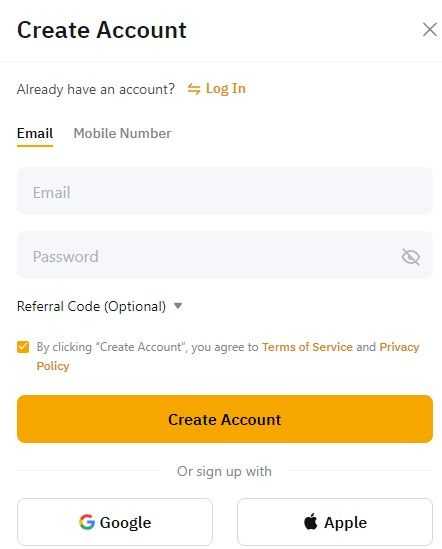
Open the app and tap the ‘Sign Up’ button.
-
Choose to register with your email or phone number.
-
Add your email or phone and set a strong password.
-
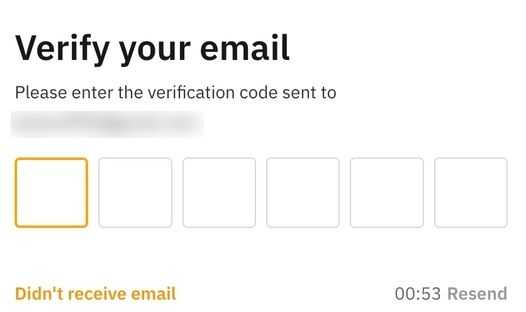
Verify your account by entering the code sent to your email or phone.
The mobile app has the same security as the desktop version. Bybit uses Threshold Signature Schemes (TSS) to keep your account safe. Whether you use the app or website, Bybit makes sure your sign-up process is secure and simple.
Tips for securing your account
Keeping your Bybit account safe is very important. Use these tips to protect your account:
-
Enable Two-Factor Authentication (2FA): This adds extra security by needing a code with your password.
-
Use a Strong Password: Make a password with letters, numbers, and symbols. Avoid easy-to-guess info like your name or birthday.
-
Monitor Account Activity: Check your account often for strange transactions or changes.
-
Avoid Public Wi-Fi: Use a safe internet connection to stop data theft when logging in.
Tip: Bybit uses three layers of security to protect your money. But staying alert is key to keeping your account safe.
By following these tips, you can keep your Bybit account secure while enjoying its features.
KYC Verification on Bybit
Why KYC Matters
KYC, short for Know Your Customer, helps keep your account safe. Bybit uses KYC to follow global anti-money laundering (AML) rules. These rules stop crimes like money laundering and fraud in crypto trading. Completing KYC makes Bybit more secure and protects your account from fraud.
When you finish KYC, you can use all of Bybit’s features. This includes higher withdrawal limits and fiat services. KYC also helps Bybit stay a trusted and secure platform. By verifying your identity, you help create a safer place for everyone to trade.
Tip: Doing KYC not only secures your account but also follows global rules. This makes your trading experience safer and more dependable.
KYC Verification Levels
Bybit has different KYC levels, each with its own benefits. Here’s a simple table showing the levels:
|
KYC Level |
Daily Crypto Withdrawal Limit |
Monthly Crypto Withdrawal Limit |
Fiat Withdrawal |
Buy Crypto Services |
|---|---|---|---|---|
|
Non KYC |
Up to 20K USDT |
Up to 100K USDT |
No |
No |
|
Individual Verification (Standard) |
Up to 1M USDT |
No Limit |
Yes |
Yes |
|
Individual Verification (Advanced/Pro) |
Up to 2M USDT |
No Limit |
Yes |
Yes |
|
Business Verification |
Up to 4M USDT |
No Limit |
Yes |
No |
Each level gives you higher withdrawal limits and more features. For example, Standard KYC lets you withdraw up to 1 million USDT daily and use fiat services. Advanced levels are great for pro traders and businesses with even higher limits.
How to Complete KYC on Desktop
Verifying your identity on Bybit’s desktop is easy. Follow these steps:
-
Log in to your Bybit account.
-
Go to “Account & Security” in the top-right menu.
-
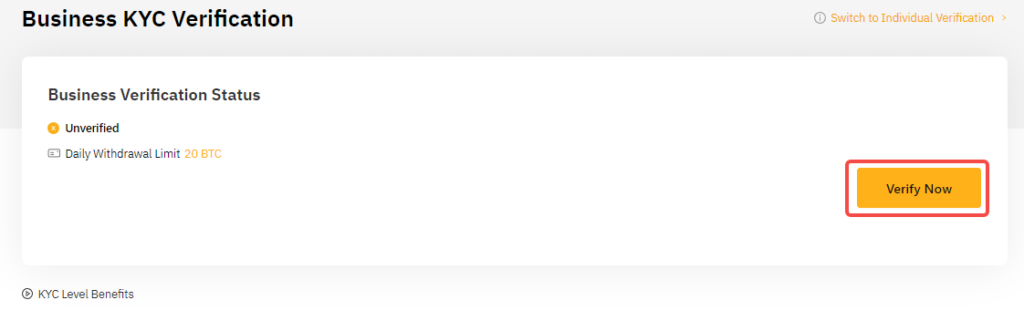
Click “Identity Verification” to start.
-
Choose the level you want (Standard or Advanced).
-
Upload documents like your passport or ID.
-
Take a selfie or upload a photo for face verification.
-
Submit everything and wait for approval.
Standard KYC usually takes a few minutes, while Advanced may take up to 24 hours. Once approved, you get better security and full access to Bybit’s features.
Note: Make sure your documents are clear and valid to avoid delays.
Step-by-step guide to completing KYC on mobile
Doing KYC on Bybit’s app is fast and simple. Follow these steps to verify your identity and unlock all features:
-
Open the Bybit App
Open the Bybit app on your phone. If you don’t have it, download it from the App Store or Google Play. -
Log in to Your Account
Enter your username and password to log in. If you don’t have an account, sign up first. -
Go to Identity Verification
Tap the profile icon at the top-right corner. Then, go to “Account & Security” and pick “Identity Verification.” -
Pick Your KYC Level
Choose the level that fits your needs. Standard is good for most users, while advanced levels allow higher withdrawals. -
Upload Your Documents
Take a clear photo of your ID, like a passport or driver’s license. Make sure it’s valid and not expired. -
Do the Liveness Check
Follow the app’s instructions to take a selfie. This proves you match the ID you uploaded. -
Wait for Approval
Submit your details and wait for Bybit to check them. Standard KYC usually takes about a minute. Advanced KYC might take longer.
Tip: Bybit uses smart tools like Sumsub to catch fake IDs. This makes the process safe and reliable.
What to Expect During Mobile KYC Verification
Bybit’s mobile KYC is easy and quick. Here are some things to know:
-
About 78% of users pass the first-level check, which includes ID and selfie verification.
-
Most people finish the process in under a minute, making it one of the fastest.
-
Bybit’s strong security keeps your data safe and ensures a smooth process.
Note: Use clear documents and make sure your selfie matches your ID to avoid delays.
Completing KYC on Bybit’s app gives you access to more features, like higher withdrawal limits and fiat services. It also keeps your account safe and follows global rules, making trading safer for everyone.
Bybit Platform Features
Overview of Trading Tools
Bybit gives you many tools to improve your trading. You get live market data and advanced charts to study trends. Custom indicators help you make smart trading choices. Bybit’s API lets you create automated trading plans for faster trades.
The platform is simple to use for all traders. It has tools like stop-loss and take-profit orders to manage risks. These features help you control trades and avoid big losses.
Tip: Try Bybit’s demo trading to practice without using real money. It’s a safe way to learn before trading live.
Benefits of Copy Trading
Copy trading on Bybit lets you follow skilled traders’ strategies. This is great for beginners or those with little time to study markets. Bybit connects you with top traders so you can learn from them.
Here are some facts about Bybit’s copy trading:
-
Traffic on Bybit grew by 42% in one year.
-
25% of users actively use copy trading tools.
These stats show how useful and popular this feature is. Bybit also shows traders’ past performance, helping you pick the right one to follow. This boosts your chances of earning more.
Note: Check a trader’s history and risk level before copying them. This ensures their style matches your goals.
Leverage Trading for Experts
Leverage trading on Bybit is for skilled traders wanting bigger gains. You can use up to 100x leverage on some trades. This means you can trade more with less money upfront.
Bybit offers tools to handle leveraged trades safely. You can choose cross-margin or isolated-margin modes to manage risks. Real-time alerts keep you updated on your positions.
Warning: Leverage trading is risky. Always use it carefully and have a plan to manage losses.
Bybit’s strong features make it ideal for advanced traders. Whether you’re copying trades or using leverage, Bybit gives you the tools to succeed.
Other features: trading bots, lending services, and crypto earn products
Bybit has tools to make crypto trading easier and more rewarding. These features help you trade smarter, grow your money, and enjoy your crypto journey.
Trading Bots
Bybit’s trading bots do trades for you automatically. They follow plans you set up, saving time and effort. You can adjust them to fit your goals, like trading often or holding coins longer. Grid bots, for example, buy low and sell high to earn from price changes. Bots help avoid emotional choices and stick to your plan.
Tip: Use demo mode first to test bots without using real money.
Lending Services
Bybit lets you earn interest by lending your crypto. You loan your coins to Bybit and get paid interest. This is a safe way to grow your money. Bybit shows clear terms and expected earnings before you start.
Note: Lending works best with stablecoins like USDT since they are steady.
Crypto Earn Products
Bybit offers flexible and fixed-term plans to earn money. Flexible plans let you take out funds anytime. Fixed-term plans give higher returns if you lock your coins for a set time. You can also try dual asset investments to earn based on market trends.
Callout: Always check the risks and rules before using crypto earn products.
Bybit’s bots, lending, and earn tools help you trade and invest better. Whether you’re new or experienced, these features make managing your crypto easier and more rewarding.
Depositing and Withdrawing Funds
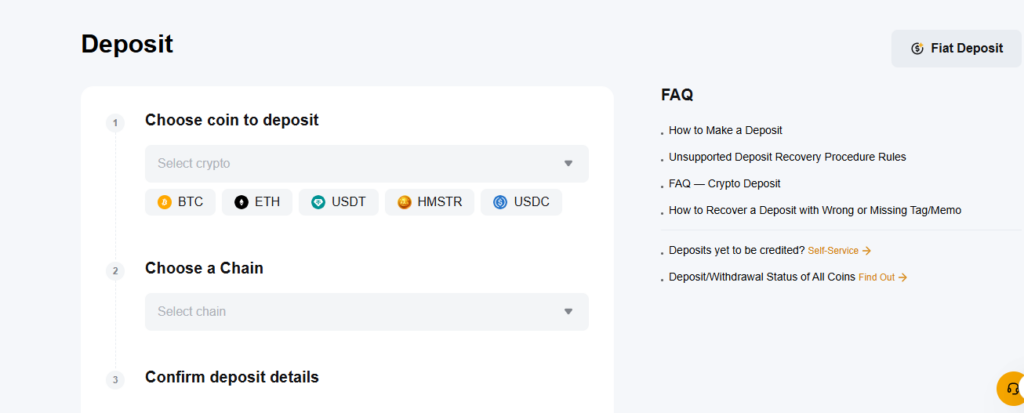
Ways to Deposit: Crypto, Fiat, and P2P Trading
Bybit lets you add funds in different ways. You can deposit cryptocurrencies, buy crypto with fiat money, or use peer-to-peer (P2P) trading.
To deposit crypto, send it from your wallet to Bybit. Each cryptocurrency has its own wallet address for safety. If you want to use fiat, you can buy crypto with a credit or debit card. This method is quick and easy for beginners.
P2P trading lets you trade fiat for crypto with other users. You can pay using bank transfers or e-wallets. This option is flexible and often has no extra costs.
How to Withdraw and Fees
Withdrawing funds from Bybit is simple. Pick the cryptocurrency you want, go to “Assets,” and enter the wallet address to send it.
Bybit charges small fees for withdrawals. The fee depends on the cryptocurrency. For example, withdrawing Bitcoin costs 0.0005 BTC. These fees cover network costs and make sure transactions are fast.
You can’t withdraw fiat directly. Instead, sell your crypto on the P2P platform to get fiat from other users. This method is popular and affordable.
Tips to Keep Deposits and Withdrawals Safe
Protecting your funds is very important. Use these tips to stay secure:
-
Make strong passwords and turn on two-factor authentication (2FA).
-
Double-check wallet addresses before sending money.
-
Never share your login details or sensitive information.
Bybit uses strong security tools to keep your transactions safe. Here’s a table of their features:
|
Security Feature |
What It Does |
|---|---|
|
Encryption |
Keeps private data safe, even during attacks. |
|
Strict Authorization Controls |
Only allows trusted staff to access sensitive data. |
|
Anti-Phishing Code |
Helps you spot fake emails and avoid scams. |
|
Real-Time Monitoring |
Quickly finds and stops suspicious activity. |
|
Manual Verification of Withdrawals |
Checks withdrawals by hand to block unauthorized transfers. |
|
Regular Third-Party Security Audits |
Finds weak spots and ensures enough reserves for deposits. |
|
Bug Bounty Programs |
Rewards people for reporting security issues to improve safety. |
By using these tips and trusting Bybit’s security features, you can safely deposit and withdraw funds.
Bybit Fee Structure
Trading fees for spot and futures trading
Bybit charges fees based on a maker/taker model. Makers add liquidity to the market, while takers remove it. Non-VIP users pay 0.10% for both maker and taker fees. VIP users get lower fees as they trade more. For example, VIP 1 users pay 0.04% maker fees and 0.06% taker fees. Pro 3 users pay no maker fees and only 0.03% taker fees.
Here’s a simple table of Bybit’s trading fees:
|
Account Type |
Maker Fee |
Taker Fee |
|---|---|---|
|
Non-VIP |
0.10% |
0.10% |
|
VIP 1 |
0.04% |
0.06% |
|
VIP 2 |
0.02% |
0.05% |
|
VIP 3 |
0.01% |
0.03% |
|
Pro 1 |
0.00% |
0.04% |
|
Pro 2 |
0.00% |
0.035% |
|
Pro 3 |
0.00% |
0.03% |
This system helps active traders save money. It’s good for beginners and experts alike.
Deposit and withdrawal fees
Depositing money on Bybit is always free. Withdrawal fees depend on the crypto you use. For example, Bitcoin withdrawals cost 0.0005 BTC. Ethereum withdrawals cost 0.005 ETH. These fees cover network costs and make transactions fast.
Bybit doesn’t allow direct fiat withdrawals. To get fiat, sell your crypto using the P2P feature. This method is cheap and popular among users.
Tip: Check withdrawal fees for your crypto before sending money.
Comparison of Bybit’s fees with competitors
Bybit’s fees are competitive but not always the lowest. OKX has lower fees for frequent traders. Bybit offers better tools and user experience, while OKX is cheaper for active trading.
Even so, Bybit is still a great choice. Its tiered system lowers costs for big traders. This makes it popular with professionals who need advanced features and strong security.
Making a Bybit account is quick and easy. You can sign up with your email or phone in just minutes. Completing KYC lets you use advanced features like higher withdrawal limits and fiat options. Level 1 KYC is simple and helps you unlock Bybit’s full features.
Bybit has beginner-friendly tools like demo accounts and copy trading. These tools help you learn and trade with confidence. Strong security, such as cold wallets and two-factor authentication, keeps your account and money safe.
Try Bybit today to enjoy its features. Turn on 2FA and check your account often to stay secure. Bybit’s safety features give all users a secure trading experience.
FAQ
What is Bybit, and why should you use it?
Bybit is a crypto exchange with easy and safe trading tools. It offers features like copy trading, leverage trading, and trading bots. With over 15 million users globally, it’s great for both beginners and experts.
Is Bybit safe for trading?
Yes, Bybit has strong security like cold wallets and 2FA. It also checks withdrawals manually to keep your money and data safe. These tools make trading secure.
How long does KYC verification take on Bybit?
Standard KYC on Bybit takes just a few minutes. Advanced KYC might take up to 24 hours. Use clear and valid documents to avoid waiting longer.
Can you trade without completing KYC on Bybit?
Yes, but your account will have limits. Non-KYC users can’t use fiat services and have lower withdrawal limits. Completing KYC gives full access and better security.
What are Bybit’s deposit and withdrawal fees?
Deposits on Bybit are free. Withdrawal fees depend on the cryptocurrency. For example, Bitcoin withdrawals cost 0.0005 BTC. Always check the fee for your crypto before withdrawing.

