

You might wonder what makes usdt-trc20 special. It’s a type of usdt, a stablecoin, that runs on the TRON network. That means you get fast and low-cost transactions. Many people use it every day because it’s simple and reliable. Take a look at these numbers:
Metric | Value |
|---|---|
Market Capitalization | |
Daily Transaction Volume | $1.00 |
Over 67.92 million accounts use TRC20-USDT.
More than 82.6 billion tokens have been issued, making up half of the global USDT supply.
Key Takeaways
USDT-TRC20 is a stablecoin on the TRON network, offering fast and low-cost transactions.
Transaction fees for USDT-TRC20 are around $0.315, significantly lower than other networks like ERC20.
Transfers are completed in seconds, making USDT-TRC20 ideal for quick payments and trading.
Holding TRX can provide free bandwidth, further reducing transaction costs.
USDT-TRC20 is perfect for freelancers, gamers, and anyone needing reliable and affordable money transfers.
What Is USDT-TRC20?
USDT-TRC20 Basics
You might see the term usdt-trc20 and wonder what it means. Let’s break it down together. USDT is a stablecoin cryptocurrency. It’s called a stablecoin because its price is pegged to the u.s. dollar. That means one USDT always tries to equal one dollar. You don’t have to worry about wild price swings like you do with other coins.
USDT-trc20 is the version of USDT that works on the TRON network. It uses the trc20 protocol, which is a set of rules for smart contracts on TRON. When you send usdt-trc20, you use Tron addresses for deposits and withdrawals. The TRON blockchain handles your transactions with smart contracts. These smart contracts automate everything, so you don’t need to trust a middleman.
Here’s why people like using usdt-trc20:
You get low transaction fees. Most transfers cost about $0.315, which is much less than other networks.
Transfers happen in seconds. You don’t have to wait long for your money to arrive.
If you hold TRX, you can use free bandwidth and energy, making your transactions even cheaper.
You can send any amount, big or small, without worrying about high costs.
Tip: USDT-trc20 saves you up to 95% on transaction fees compared to ERC20. That’s a huge difference if you send money often.
USDT-trc20 works well for merchants, freelancers, and gamers. You can use it for peer-to-peer payments, trading, or even joining decentralized finance (defi) platforms like JustLend or SunSwap. The number one stablecoin on TRON helps you move money quickly and cheaply.
Benefit | Description |
|---|---|
Low Transaction Fees | Fees are about $0.315, much lower than ERC20. |
Speed of Transfers | Transfers finish in seconds, so you don’t have to wait. |
Real-World Use Cases | Great for freelancers, OTC trading, and gaming worldwide. |
Tether and Stablecoins
Let’s talk about Tether and why it matters. Tether is the company behind USDT. They created USDT to give you a stablecoin that always matches the value of the u.s. dollar. You can think of Tether as the bridge between regular money and crypto.
Stablecoins like USDT help you avoid the ups and downs of other cryptocurrencies. You can use USDT for trading, saving, or sending money without worrying about losing value overnight. Tether keeps USDT stable by holding reserves that match the amount of USDT in circulation.
USDT-trc20 is just one way you can use USDT. You get all the benefits of a stablecoin, plus the speed and low fees of the TRON network. If you want to join decentralized finance or send money across the world, USDT-trc20 makes it easy.
Note: USDT-trc20 is becoming more popular in the United States. Many users choose it because they’re tired of high fees and slow transactions on other networks.
You now know that USDT-trc20 is a stablecoin cryptocurrency, powered by Tether, and built on the trc20 protocol. It gives you fast, cheap, and reliable transactions. You can use it for trading, payments, or defi. It’s simple, safe, and perfect for beginners.
TRC20 Token Standard
The trc20 token standard is what makes USDT-TRC20 possible. You can think of trc20 as a set of rules that every token on the tron network must follow. These rules make sure your tokens work smoothly with wallets, exchanges, and apps. When you use trc20 tokens, smart contracts handle everything behind the scenes. They keep your transactions fast, secure, and reliable.
Here’s what the trc20 protocol does for you:
It uses smart contracts to define how tokens behave.
It works perfectly with the TRON Virtual Machine, so you get seamless integration.
You can transfer tokens, check your balance, and approve transfers easily.
Security is built in, so your transactions stay safe.
Functions like
balanceOf(),transfer(), andapprove()help you manage your tokens.
When developers want to create a new trc20 token, they deploy a smart contract on the tron network. This process sets up all the rules for the token, including how many exist and how they move between users. The tron network’s energy and bandwidth system keeps transaction fees low—usually under $0.315.
TRC20 vs ERC20
You might wonder how trc20 compares to erc20, which runs on Ethereum. The biggest differences are speed and cost. Take a look at this table:
Token Type | Average Transaction Fee | Average Transaction Speed |
|---|---|---|
ERC20 | $3 to $5 | 35–60 seconds |
TRC20 | $2.5 | 3–5 seconds |
The tron network can handle about 2,000 transactions per second. Ethereum only manages 15 to 30. That means your trc20 transfers finish much faster and cost a lot less. You don’t have to wait or pay high fees.
Tip: If you send money often, trc20 tokens save you both time and money.
TRON Network Features
The tron network gives you even more reasons to use trc20 tokens. Here are some key features:
Feature | Description |
|---|---|
Hardware Wallet Support | Store large amounts safely and use offline keys for extra security. |
Address Format and Network ID | TRC20 addresses start with ‘T’, so you always know you’re on the right network. |
Exchange Integration and Liquidity | Most major exchanges support USDT-TRC20, making trading easy and cheap. |
Smart Contract Architecture | Standard functions plus extra features for compliance and tracking. |
About 2,000 transactions per second, so payments feel instant. | |
Cost Structure | Stake TRX for free bandwidth, making small transfers almost free. |
You can stake TRX to get free bandwidth, which means you might not pay any fees for regular trc20 transfers. The tron network’s design helps you move money quickly, safely, and at a low cost.
USDT-TRC20 on TRON
How Transactions Work
You might wonder how you actually send or receive usdt-trc20 on the TRON network. The process is simple and quick. Here’s what you do:
First, get the recipient’s TRC20 address. This address always starts with a “T.”
Make sure your wallet has enough usdt and a small amount of TRX. You need TRX to pay for the network fee.
Open your TRC20-compatible wallet. Enter the recipient’s address and the amount you want to send.
Confirm the transaction. The wallet will use smart contracts to handle everything for you.
If you want to receive usdt-trc20, just give your TRC20 address to the sender. The funds will show up in your wallet soon after.
Every transfer uses “energy” and “bandwidth” from the TRON network. If you hold some TRX in your wallet, you get free bandwidth and energy, which helps keep your fees low. Smart contracts on TRON make sure your transactions are safe and automatic.
Tip: Always double-check the address before you send. Crypto transactions can’t be reversed!
Speed and Fees
You don’t have to wait long for your money to arrive. Most usdt-trc20 transfers finish in less than one minute. That’s much faster than many other blockchains.
When it comes to fees, the TRON network keeps things affordable. Here’s a quick look at typical costs:
Wallet Type | Energy Required | Cost in TRX | Approx. Cost in USD |
|---|---|---|---|
Non-empty | 64,285 units | 13.5 TRX | ~$3.38 |
Empty | 130,000 units | 27.3 TRX | ~$6.83 |
Typical Range | N/A | N/A | $1 – $3 |
Maximum Fee | N/A | N/A | ~$7 |

Most transactions cost between $1 and $3. Sometimes, you might pay as little as $0.40 or as much as $7, but that’s rare. Compared to Ethereum, where a single transaction can cost $5 to $50, TRON is much more budget-friendly.
Note: Fast confirmation times and low fees make usdt-trc20 a favorite for people who need to move money quickly.
USDT-TRC20 vs ERC20
Key Differences
You might wonder how trc20 and erc20 compare. Both let you use usdt, but they work on different blockchains. Trc20 runs on the TRON network, while erc20 uses Ethereum. This difference changes how fast and cheap your transactions are.
Trc20 tokens use smart contracts made by TRON. These contracts help you send money quickly and with low fees. Erc20 tokens use Ethereum’s Virtual Machine. This gives you more wallet choices and connects you to many apps, but it can slow things down and raise costs.
Here’s a simple table to show you the main differences:
Feature | USDT-TRC20 | USDT-ERC20 |
|---|---|---|
Blockchain | TRON | Ethereum |
Transaction Speed | 15 to 30 TPS, 10-20 seconds | |
Transaction Fees | $0.1 to $0.5 | $1 to $3 (up to $5–$15 during peaks) |
Network Compatibility | Limited to TRON ecosystem | Extensive Ethereum ecosystem |
You can see that trc20 gives you much faster speeds and lower fees. If you send money often, this can save you a lot.
Let’s break it down even more:
Trc20 works on the TRON network and focuses on fast, scalable transactions.
Erc20 is built on Ethereum and connects to many wallets and apps.
Trc20 gives you faster transfers and lower costs than erc20.
Tip: If you want your money to arrive in seconds and pay less, trc20 is the better choice.
The numbers tell the story. Trc20 can process about 2,000 to 2,500 transactions per second. Each transfer takes just 1 to 3 seconds. Erc20 only handles 15 to 30 transactions per second, and you might wait 10 to 20 seconds or more, especially when the network is busy.
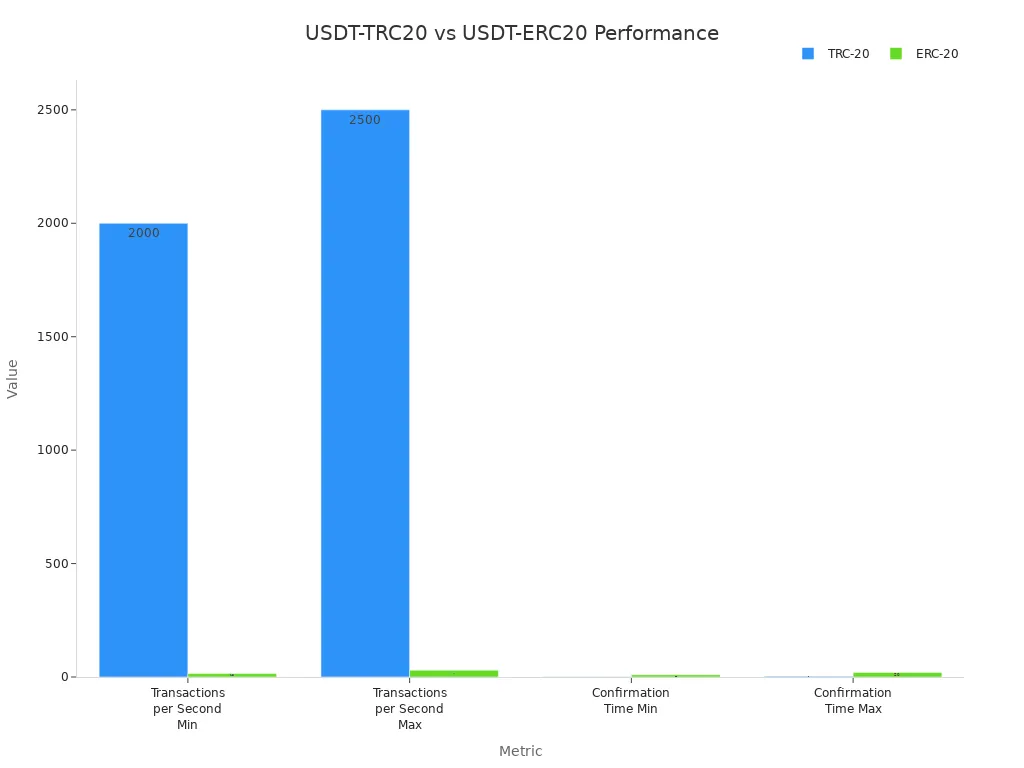
Fees matter, too. Trc20 usually costs between $0.1 and $0.5 per transaction. Even when the network is busy, you rarely pay more than $1. Erc20 fees start at $1 to $3 and can jump to $5 or even $15 when Ethereum gets crowded.
Here’s another quick look:
Standard | Average Fee | Peak Fee |
|---|---|---|
TRC-20 | $0.1 – $0.5 | Rarely exceeds $1 |
ERC-20 | $1 – $3 | $5 – $15+ |
Why Choose USDT-TRC20?
You have many choices when you use usdt, but trc20 stands out for a few big reasons.
Trc20 lets you send money in seconds. You don’t have to wait for long confirmations.
You save money. Trc20 fees average just $0.315, while erc20 can cost $5 or more.
The TRON network is built for high volume. You can send usdt-trc20 as often as you want, and it won’t slow down.
If you use usdt for trading, payments, or sending money to friends, trc20 makes it easy and cheap.
Note: Many people pick trc20 for daily transfers because it’s fast and affordable. You don’t need to worry about high fees eating into your money.
Tether created usdt to give you a stablecoin that works for everyone. When you pick trc20, you get all the benefits of usdt with the extra speed and savings of the TRON network. You can use trc20 for trading, shopping, or sending money home. It works well for beginners and experts alike.
If you want a smooth, low-cost experience, trc20 is the way to go. You get your money fast, pay less, and enjoy a network designed for easy transfers.
Using USDT-TRC20
Setting Up a USDT TRC20 Wallet
You need a usdt trc20 wallet before you can send or receive any tokens. Picking the right wallet keeps your funds safe and makes things easy. Here are some of the most popular options:
Trust Wallet – This wallet supports many coins and uses biometric authentication for extra safety.
Klever Wallet – It focuses on trc20 tokens and uses advanced security.
TronLink – You get hardware wallet support and access to many DApps.
Atomic Wallet – This wallet updates security often and offers 24/7 support.
imToken – It uses bank-grade security and gives you backup options.
Each usdt trc20 wallet has its own features, but all let you store, send, and receive trc20 tokens. Always choose a wallet that supports trc20 and has strong security.
Sending and Receiving USDT-TRC20
You can send or receive usdt-trc20 with just a few taps. First, make sure your usdt trc20 wallet is set up and has some TRX for network fees. To receive, share your trc20 address (it starts with “T”) from your wallet. To send, enter the recipient’s trc20 address, type the amount, and confirm.
Tip: Always double-check the address before sending. Crypto transactions can’t be reversed!
If you run into problems, check these common issues:
Make sure your wallet supports trc20 tokens.
Use the correct network. Sending to the wrong network can cause lost funds.
Review the fee schedule in your wallet to avoid surprises.
Enable two-factor authentication for extra security.
Step-by-Step Guide
Let’s walk through setting up your first usdt trc20 wallet and making a transaction:
Download your chosen wallet app (like Trust Wallet or TronLink).
Create a new wallet and set a strong password.
Write down your recovery phrase and keep it offline.
Add usdt-trc20 to your wallet by searching for it in the token list.
To receive, tap “Receive,” copy your trc20 address, and share it.
To send, tap “Send,” enter the recipient’s trc20 address and amount, then confirm.
Enable security features like two-factor authentication if your wallet offers them.
If you ever get stuck, check your wallet’s help section or reach out to their support team. Most issues come from using the wrong network or address, so always double-check before you hit send.
Safety Tips
Protecting Your Wallet
Keeping your USDT-TRC20 wallet safe should always come first. You want to make sure no one else can access your funds. Here are some simple steps you can follow:
Watch out for scams and phishing attacks. Always double-check wallet addresses before sending money. Use two-factor authentication (2FA) whenever possible. This extra step makes it much harder for someone to break in.
Keep your wallet software updated. Updates fix bugs and close security holes. Check for updates often and install them right away. You should also look at your transaction history regularly. If you see anything strange, act fast.
Back up your wallet and recovery phrase. Write down your recovery phrase and store it somewhere safe, away from your computer or phone. If you lose your device, you can still get your funds back. For even more safety, think about using a hardware wallet. These wallets store your keys offline, making them much harder to hack.
Tip: Never share your recovery phrase or private keys with anyone. No real support team will ever ask for them.
Avoiding Scams
Scammers always look for new ways to trick people. You can stay safe by learning about the most common scams and how to spot them:
Phishing and social engineering: Scammers send fake emails or messages to steal your info. Always check the website address and never click on links from strangers.
Ponzi schemes: If someone promises huge profits with little risk, be careful. Real investments do not guarantee high returns.
Pump and dump schemes: Some groups hype up a token to raise its price, then sell off their coins. If you see aggressive promotions, take a step back.
Pig butchering scams: Scammers build trust over time and then ask you to invest in fake projects. Be wary of anyone who contacts you out of the blue.
AI-enhanced scams: Some scams use AI to make fake advice look real. If something seems too perfect or polished, double-check it.
Note: If you ever feel unsure, ask someone you trust or check official sources before making a move. Staying alert keeps your crypto safe!
USDT Use Cases
Trading and Payments
You might wonder how people use USDT-TRC20 in real life. The answer is simple: it makes trading and payments much easier for everyone. Many freelancers, businesses, and even gamers choose USDT-TRC20 because it saves money and time. For example, a business in Manila paid an Indian coder $200 using USDT-TRC20. The fee was only $0.28, so they saved $10 compared to PayPal. That’s a big difference!
Chinese merchants love USDT-TRC20 for over-the-counter (OTC) trading. They get fast and cheap transactions, which helps them move money quickly. The gaming platform WINk also uses USDT-TRC20 for betting. Players enjoy quick deposits and withdrawals, making the gaming experience smoother.
Here’s a quick look at some common use cases:
Use Case | Description | Cost Savings/Benefits |
|---|---|---|
Freelancer Payments | Pay workers worldwide with low fees and fast delivery. | Save up to $10 per payment. |
OTC Trading | Move funds quickly for business deals. | Fast and cheap transactions. |
Gaming | Bet and play with instant payouts. | Quick and low-cost betting. |
E-commerce | Pay suppliers around the world without waiting for bank wires. | Faster and cheaper than banks. |
Accepting USDT-TRC20 helps you avoid exchange rate swings and high fees. You can use it for both personal and business payments.
Remittances and Savings
Sending money to family or saving for the future gets easier with USDT-TRC20. You can transfer funds across borders almost for free. Traditional banks often charge high fees and take days to process transfers. With USDT-TRC20, your money arrives in seconds.
You stay in control of your assets. You don’t need a bank or a middleman. This means you can manage your savings safely and privately. Businesses also benefit from lower fees, which adds up to big savings over time.
International transfers finish in seconds.
You avoid high bank fees.
You keep your money safe and under your control.
Many people and businesses now use USDT-TRC20 for regular payments, savings, and sending money home. It’s practical, fast, and reliable.
You now see why USDT-TRC20 stands out as the number one stablecoin for beginners. It gives you fast, low-cost transactions and keeps your money stable. If you want to get started, try these steps:
Pick a trusted wallet that supports USDT-TRC20.
Double-check the TRC20 address before sending USDT.
Keep some TRX handy for transaction fees.
Remember: Always confirm the network and follow local rules for safe and smooth crypto use.
FAQ
What is the difference between USDT-TRC20 and USDT-ERC20?
USDT-TRC20 runs on the TRON network. USDT-ERC20 uses Ethereum. TRC20 gives you faster transfers and lower fees. ERC20 connects to more apps but costs more and takes longer.
Do I need TRX to send USDT-TRC20?
Yes, you need a small amount of TRX in your wallet. TRX pays for the network fee when you send USDT-TRC20. Without TRX, your transaction will not go through.
Can I send USDT-TRC20 to an Ethereum address?
No, you cannot. USDT-TRC20 only works with TRON addresses that start with “T.” Sending to an Ethereum address will cause you to lose your funds.
Is USDT-TRC20 safe to use?
Yes, USDT-TRC20 is safe if you protect your wallet and recovery phrase. Always double-check addresses and use two-factor authentication. Stay alert for scams and phishing attempts.
How fast do USDT-TRC20 transactions complete?
Most USDT-TRC20 transfers finish in seconds. You usually see your funds in less than a minute. The TRON network processes transactions quickly, so you do not have to wait long.

