

USDT TRC20 is a digital dollar that runs on the TRON network. You use it just like cash, but online. USDT is the most popular stablecoin, with a market value of $137 billion as of January 2025. Every USDT equals one US dollar, so you do not worry about big price swings. When you choose the TRON network, you get fast transfers and very low fees. Millions of people move USDT every day, making it one of the busiest cryptocurrencies. Tether stablecoin helps you trade, save, or send money with ease.
Key Takeaways
USDT TRC20 offers fast transactions, confirming in just 1 to 3 seconds, making it ideal for quick payments.
Using USDT TRC20 saves money with lower fees, typically between $0.1 and $0.5, compared to higher fees on other networks.
The dollar peg of USDT ensures price stability, allowing users to trade and save without worrying about value fluctuations.
Always verify the USDT TRC20 contract address before sending funds to avoid mistakes and ensure your money is secure.
Choose a reliable wallet that supports USDT TRC20 to manage your tokens safely and efficiently.
What is USDT TRC20?
USDT TRC20 Overview
You can think of USDT TRC20 as a digital version of the US dollar that lives on the TRON blockchain. This token is a type of stablecoin, which means its value stays close to one US dollar at all times. Tether, the company behind USDT, makes sure each token matches the value of a real dollar. When you use trc20 usdt, you get the benefits of fast and cheap transactions. The usdt trc20 contract address is what lets you send and receive these tokens safely on the TRON network. Every time you want to check your balance or transfer funds, you use the usdt trc20 contract address. This address is unique and helps you avoid mistakes when moving your money.
You might wonder how USDT TRC20 compares to other types of USDT. The table below shows some key differences between USDT TRC20 and USDT ERC20:
Feature | USDT TRC20 | USDT ERC20 |
|---|---|---|
Blockchain Network | TRON | Ethereum |
Transaction Speed | 2,000 – 2,500 TPS | 15 – 30 TPS |
Confirmation Time | 1 – 3 seconds | 10 – 20 seconds |
Average Transaction Fee | $0.1 – $0.5 | $1 – $3 (up to $15 during peak) |
Ecosystem Compatibility | Limited to TRON ecosystem | Extensive Ethereum ecosystem |
You can see that trc20 usdt on TRON gives you much faster and cheaper transactions than on Ethereum. The usdt trc20 contract address is what makes these quick transfers possible.
How USDT Works on TRON
When you use trc20 usdt, you interact with the TRON blockchain. The usdt trc20 contract address is the key to sending and receiving tokens. You need to use the correct usdt trc20 contract address every time you make a transaction. This address keeps your funds safe and ensures your tokens go to the right place.
The TRON network uses a special system to keep everything running smoothly.
USDT TRC20 operates on TRON’s Delegated Proof-of-Stake (DPoS) consensus mechanism, which utilizes 27 Super Representatives to validate transactions.
This system helps confirm your transactions quickly and keeps the network secure. When you want to transfer trc20 usdt, you follow a few simple steps:
Visit the official TR.ENERGY website.
Input your TRON wallet address.
Use the calculator to determine the required energy or transaction amount.
Select the rental duration (1 hour or 24 hours).
Click ‘Buy TRON Energy’.
Transfer the calculated TRX amount to the specified wallet address.
Confirm your payment by clicking ‘I paid’.
Receive the energy in your wallet shortly after.
After you have enough energy, you can send trc20 usdt by entering the recipient’s usdt trc20 contract address. You then confirm the transaction, which may require a PIN, password, or biometric check. You wait for confirmation and get a transaction ID to track your transfer on the blockchain. The usdt trc20 contract address is always involved in these steps, making sure your tokens move safely.
Why Use USDT TRC20
You get many advantages when you choose trc20 usdt for your digital payments. The usdt trc20 contract address lets you send money almost instantly. You pay much lower fees than with other networks or traditional banks. The table below shows how USDT TRC20 fees compare to other networks:
Network | USDT Token Standard (Protocol) | Fee Amount |
|---|---|---|
TRON | TRC-20 | $0.315 |
Ethereum | ERC-20 | $1.15 |
BSC | BEP-20 | $1.00 |
You can see that trc20 usdt on TRON costs less to send than on Ethereum or Binance Smart Chain. The usdt trc20 contract address is what makes these low fees possible.
When you use trc20 usdt for international remittances, you enjoy even more benefits:
Transaction fees for usdt are often less than $1, compared to $25 to $50 for traditional wire transfers.
Usdt transactions confirm within a couple of minutes, while traditional payments can take 3-5 business days.
Usdt maintains price stability, ensuring that a payment today will retain its value tomorrow.
Usdt transactions benefit from robust security features provided by blockchain technology.
Usdt significantly reduces transaction fees compared to traditional banking systems.
Usdt transactions are completed almost instantaneously, enhancing cash flow management.
The blockchain technology behind usdt offers superior security features compared to traditional financial systems.
You can trust trc20 usdt for trading, saving, or sending money to friends and family. The usdt trc20 contract address keeps your funds safe and makes every transaction easy. If you want to use a stablecoin that is fast, cheap, and reliable, usdt-trc20 is a smart choice. Always double-check the usdt trc20 contract address before you send or receive tokens. This simple step helps you avoid mistakes and keeps your money secure.
TRC20 USDT Token Basics
TRC20 Standard Explained
When you use trc20 usdt, you use a token built on the TRON blockchain. The trc20 standard sets the rules for how tokens like usdt trc20 work on this network. These rules make sure every trc20 token acts the same way, no matter which wallet or app you use. This helps you move your usdt trc20 between different platforms without problems.
The trc20 standard plays a big role in the TRON ecosystem. It lets you use your trc20 usdt token in many places, such as DeFi apps, games, and exchanges. Because all trc20 tokens follow the same set of rules, you can trust that your usdt will work smoothly across different services. This standard also helps keep your transactions secure and efficient. By following a unified protocol, trc20 tokens make it easy for you to interact with smart contracts and other blockchain tools.
Note: The trc20 standard ensures that tokens on the TRON network can interact safely and consistently. This is important for keeping everything connected and working well together.
TRC20 vs ERC20
You might wonder how trc20 usdt compares to usdt on other networks, like Ethereum. The main difference comes from the token standards: trc20 for TRON and erc20 for Ethereum. Both let you use usdt, but your experience can change depending on the network.
Here is a table to help you see the differences:
Feature | TRC20 USDT | ERC20 USDT |
|---|---|---|
Blockchain Network | TRON | Ethereum |
Transaction Fees | Lower fees | Higher fees |
Transaction Speed | Fast (over 100 per second) | Slower (15-20 per second) |
Wallet Support | TRON-specific wallets | Supported by most wallets |
Security and Decentralization | Some centralization concerns | Highly decentralized |
Network Congestion | Rarely congested | Can be congested |
When you use trc20 usdt, you get faster transfers and lower fees. You rarely face network congestion, so your usdt trc20 moves quickly. However, you need a wallet that supports the TRON network. If you use erc20 usdt, you get more wallet options and a highly secure, decentralized system, but you may pay higher fees and wait longer for transactions.
Most exchanges now support both trc20 usdt and erc20 usdt. You can choose the network that fits your needs. If you want speed and low cost, trc20 usdt is a great choice. If you need broad compatibility, erc20 usdt may work better for you.
USDT on the TRON Network

Key Features
When you use trc20 usdt, you get access to some of the fastest and cheapest transactions in the crypto world. The tron blockchain can process up to 2,000 transactions per second. Most transfers finish in just a few seconds. You rarely wait more than three minutes for full confirmation, even when the network is busy. This speed makes trc20 usdt perfect for sending money quickly.
You also save money with trc20 usdt. Fees for trc20 transfers are much lower than those on Ethereum. You usually pay between $3.38 and $6.83 for each transfer. If you use Ethereum, fees can jump to $20 or more during busy times. Tron processed $151.17 billion in weekly usdt transfers, which is $43 billion more than Ethereum. Many people choose trc20 usdt for high-volume transfers because it costs less.
Here are some facts about trc20 usdt activity on the tron blockchain:
The tron network handles over 14 million usdt transactions every week.
About 69% of all usdt activity happens on tron.
This share has grown from 61% since January.
You see more people using trc20 usdt every year. In 2021, the supply of usdt trc20 jumped from $6.71 billion to $39.41 billion. By mid-2025, it reached $80.76 billion. On November 13, 2024, tron passed Ethereum in total usdt circulation.
Metric | Value |
|---|---|
Circulation of TRC20-USDT | 80.6 billion |
Percentage of total USDT | |
Number of holding accounts | 67.29 million |
Total transfers | Over 2.594 billion |
You can see that trc20 usdt is now the most popular stablecoin issued on the tron blockchain.
Benefits for Users
You get many benefits when you use usdt trc20. The most important is stability. Tether backs every usdt token with real-world assets, mostly US dollars. This keeps the value of usdt close to $1 at all times. Tether also shares regular reports to prove its reserves. You can trust that your usdt will hold its value.
Tip: Always check that you are using the correct trc20 usdt address before sending funds. This helps you avoid mistakes and keeps your money safe.
You can use usdt trc20 for many things:
Trading on exchanges
Sending money to friends or family
Paying for goods and services
Saving money without worrying about price swings
Both retail and institutional users like usdt trc20 because it offers low fees and fast transactions. The number of holding accounts now exceeds 67 million. The total number of transfers is over 2.5 billion. This shows that more people trust usdt on the tron network for daily use.
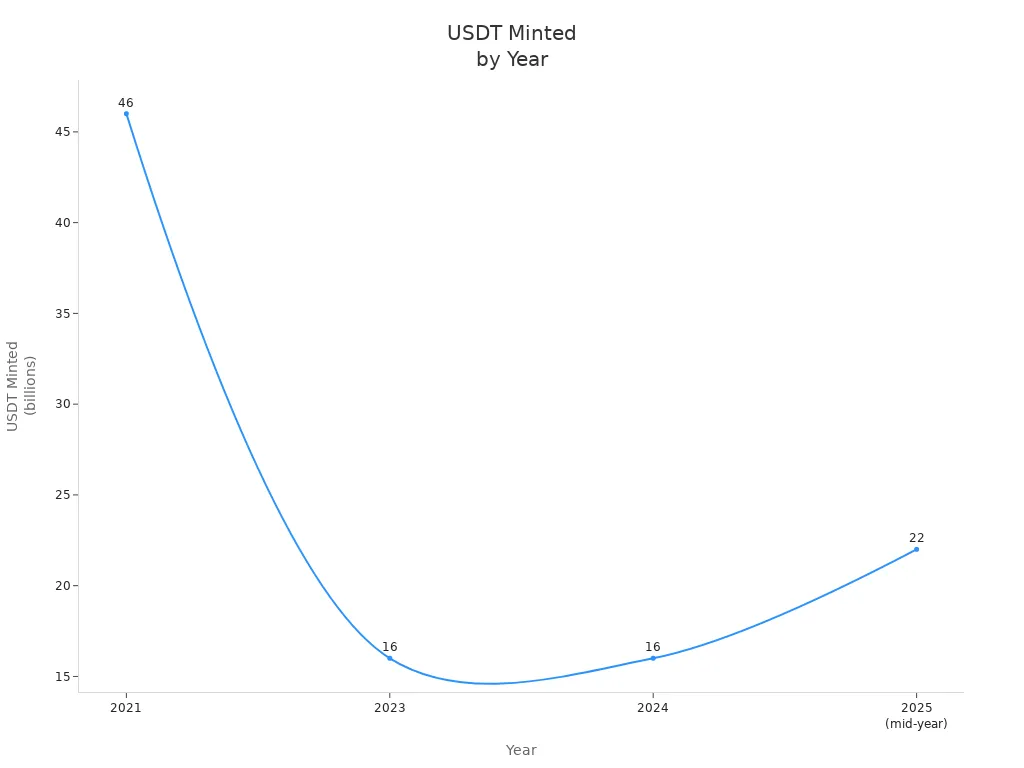
You see that the amount of usdt minted keeps growing each year. This growth comes from both regular users and big companies who want a stablecoin that works well for large transactions.
Here is a quick summary of why you might choose trc20 usdt:
You pay lower fees than on other networks.
You get fast transactions, even when the network is busy.
You enjoy price stability because tether on tron backs every token with real assets.
You can use trc20 usdt for trading, remittance, and saving.
You join a network with over 67 million accounts and billions of transactions.
When you use usdt-trc20, you get a stablecoin issued on the tron blockchain that is fast, cheap, and trusted by millions.
TRC20 USDT Wallet Guide
Choosing a Wallet
When you start with usdt trc20, picking the right usdt trc20 wallet is important. You want a wallet that is easy to use and keeps your trc20 usdt safe. Many wallets support usdt trc20, but some are better for beginners. Here are some top choices:
Trust Wallet – The all-rounder champion
TronLink – The TRON network specialist
Atomic Wallet – The feature-rich option
Klever Wallet – The speed demon
Exodus Wallet – Simple and user-friendly
Coinomi – Multi-asset support
Guarda Wallet – Secure and flexible
Each usdt trc20 wallet offers a user-friendly interface and strong security. You can manage your usdt and other trc20 tokens with ease. Some wallets, like Trust Wallet and TronLink, focus on the tron network, making them perfect for trc20 usdt.
Setting Up a Wallet
Creating a usdt trc20 wallet is simple. Follow these steps to get started:
Pick a usdt trc20 wallet from the list above.
Download and install the wallet app on your device.
Open the app and create a new wallet. Set a strong password.
Write down your recovery phrase and keep it safe. This helps you recover your usdt trc20 wallet if you lose your device.
Connect your wallet to the tron network. Now you can receive and send trc20 usdt.
A good usdt trc20 wallet lets you add and manage any trc20 tokens. You can also swap tokens and check your balance easily.
Wallet Security Tips
Keeping your usdt trc20 wallet safe should be your top priority. Here are some tips to protect your trc20 usdt:
Use two-factor authentication (2FA) for extra security.
Update your usdt trc20 wallet app often to fix bugs and stay safe.
Back up your wallet data and recovery phrase in a secure place.
Watch out for scams and phishing. Always double-check wallet addresses.
Choose a usdt trc20 wallet that stores private keys on your device, not online.
Some wallets offer biometric authentication and encrypted private keys. Cold storage options keep your usdt-trc20 offline for extra safety. By following these steps, you keep your usdt trc20 wallet secure and your usdt safe.
How to Buy USDT TRC20
Find an Exchange
You need a trusted exchange to buy usdt trc20. Many platforms let you buy usdt, but some stand out for their safety and ease of use. Look for exchanges that show all fees, offer a simple interface, and provide support at any time. Here is a table to help you choose:
Feature | Description |
|---|---|
Customers know exactly what they are paying for without surprises. | |
Hassle-free interface | The platform is easy to navigate, enhancing user experience. |
24/7 support | Continuous customer support is available for any inquiries. |
Popular exchanges like Binance, KuCoin, and ChangeNOW meet these standards. They support trc20 usdt and make it easy to buy usdt trc20 with your local currency.
Buying Steps
You can buy usdt trc20 in just a few steps. Follow this guide to make your first purchase:
Visit the exchange website and select usdt as the token you want to buy. Choose your preferred fiat currency.
Enter your trc20 usdt wallet address. Make sure it supports trc20 tokens on the tron network.
Check all transaction details before you continue.
Pick a payment method. Enter your credit card or other payment information.
After you confirm your payment, the exchange will send usdt to your wallet. This usually takes about 10 minutes.
You can use these steps on most exchanges that support trc20 usdt. Always double-check your wallet address before you buy usdt trc20.
Avoiding Scams
You must stay alert when you buy usdt trc20. Scammers often target new users. Watch out for these common tricks:
Multisig scams: Someone may ask you to add them as a co-owner of your wallet. This gives them control over your funds.
Phishing and impersonation: Scammers pretend to be customer support and try to steal your wallet details.
Get rich quick scams: They promise fast profits and show fake stories to trick you.
To protect yourself, follow these tips:
Keep your private keys and seed phrases secret.
Use only official wallet apps and software.
Check your wallet permissions often.
Tip: Always use trusted exchanges and wallets when you buy usdt. Never share your private information with anyone.
You can safely buy usdt trc20 and enjoy the benefits of trc20 usdt on the tron network. Take your time, follow each step, and protect your funds.
Sending and Receiving TRC20 USDT
Sending Steps
You can send USDT using the trc20 standard with just a few simple steps. Start by opening your wallet and making sure you have enough USDT for the transfer. Follow these steps for sending USDT transfers:
Tap the Portfolio tab in your wallet app.
Scroll down to your Tether USDT wallet and select ‘Send’.
Add the address you want to send USDT to by clicking ‘add address’.
Choose to whitelist an external network, then select TRON.
Paste the recipient’s TRON address in the box and click ‘Submit’.
Your external TRON address is now whitelisted and ready for transfers.
Enter the amount of USDT you want to send and confirm the transaction.
Double-check the TRON address before you complete the transfer.
You should always check the details before sending USDT. Using the correct TRON address helps you avoid mistakes and keeps your USDT safe. If you enter the wrong address, your USDT transfers may not reach the right person. Each transfer moves your USDT quickly and securely across the TRON network.
Tip: Always verify the recipient’s TRON address before sending USDT transfers. This step protects your funds from being lost.
Receiving Steps
Receiving USDT transfers with trc20 is easy. You only need to share your TRON wallet address with the sender. Here are some important steps for receiving USDT:
Make sure your wallet supports the trc20 protocol before receiving USDT.
Check your wallet details to confirm you are using TRC20 USDT, not another token standard.
Give the sender your correct TRON address for USDT transfers.
After the sender completes the transfer, check your wallet balance for the new USDT.
You should always confirm your wallet compatibility with trc20 before receiving USDT. If you use the wrong address or a wallet that does not support trc20, you may lose your USDT. Each transfer adds USDT to your wallet almost instantly.
Note: Always check the TRC20 USDT details in your wallet to avoid confusion with other types of USDT transfers.
Sending USDT and receiving USDT with trc20 is fast and simple. You only need to follow the steps and use the correct TRON address for every transfer. This way, your USDT transfers stay safe and reach the right wallet every time.
Storing USDT TRC20 Safely
Backup Tips
You need to protect your usdt by backing up your wallet the right way. If you lose access to your wallet, you could lose all your usdt. Start by writing down your backup passphrase on paper and keep it somewhere safe and offline. Never store this passphrase on your phone or computer, because hackers can find it. You should also set up a PIN or use biometrics like fingerprint or face recognition to lock your wallet. This makes it harder for anyone else to open your wallet. Add two-factor authentication for another layer of security. With these steps, you make sure only you can reach your trc20 usdt.
Tip: Always test your backup by restoring your wallet on a different device. This helps you know your backup works before you need it.
If you use your trc20 wallet for decentralized finance, you must keep your backup phrase private. Sharing it with anyone can let them take your usdt. You should check your backup every few months to make sure you can still read it and it is not damaged.
Common Mistakes
Many beginners lose usdt because they make simple mistakes. You can avoid these problems if you know what to watch out for:
You might send usdt to the wrong network. Always pick trc20 before you transfer. If you send to ERC20 or another chain, you lose your usdt forever.
You need to keep some TRX in your wallet. Without TRX, you cannot pay fees and your trc20 transactions will fail.
Double-check every wallet address you paste. One wrong letter means your usdt goes to someone else and you cannot get it back.
Wait for blockchain confirmation before you move your usdt again. If you act too soon, your transaction might fail or get stuck.
Use trusted wallets like TronLink or major exchanges. Some wallets do not support trc20 usdt, so you could lose your funds.
Only use bridges that are audited and well-known when moving usdt between chains. Unverified services can steal your usdt.
Note: Keeping your private key secret is the most important step. If someone gets your private key, they can take all your usdt.
You can keep your usdt safe by following these tips and avoiding common mistakes. This helps you use trc20 in defi and other places without worry. The tron network gives you strong security, but you must do your part to protect your wallet.
You can choose usdt trc20 for its stability, speed, and low fees. Many people use trc20 usdt because transfers confirm in seconds and cost less than other networks. The dollar peg helps you avoid big price swings. The tron network lets you use usdt for trading, saving, or sending money. Always pick trusted wallets and exchanges. Follow safety tips to protect your usdt. Learn more about usdt-trc20 before you start. Understanding the basics helps you avoid mistakes and keeps your trc20 safe.
Fast transfers and low fees make trc20 usdt ideal for beginners.
The dollar peg gives you price stability.
The tron network supports easy trading and saving with usdt.
FAQ
What is the difference between USDT TRC20 and other USDT types?
You use USDT TRC20 on the TRON network. It gives you faster transfers and lower fees than other types. Always check the network before you send or receive USDT.
Do I need TRX to send USDT TRC20?
Yes, you need a small amount of TRX in your wallet. TRX pays for the network fees when you send USDT TRC20. Without TRX, your transaction will not go through.
How can I check if my wallet supports USDT TRC20?
You can look for TRON or TRC20 support in your wallet’s settings. Many popular wallets show the supported networks. If you see TRC20 listed, you can safely store and send USDT TRC20.
What should I do if I send USDT TRC20 to the wrong address?
You cannot get your USDT TRC20 back if you send it to the wrong address. Always double-check the recipient’s TRON address before you confirm any transfer.
Is USDT TRC20 safe to use?
USDT TRC20 uses blockchain technology for security. You keep your funds safe by using trusted wallets, keeping your private keys secret, and following good security practices.

